Does a VPN Hide Your Location? Everything You Need to Know



Key Takeaways
- A VPN hides your IP-based location by routing traffic through a server elsewhere, making websites see the VPN server's location rather than yours — but it can't mask GPS-based location tracking, since GPS operates independently of your internet connection.
- Important distinction for mobile users: a VPN can hide your location from websites and apps relying on IP addresses, but features like "Find My iPhone" or apps with GPS permissions will still show your real location, since they don't rely on internet routing.
- A VPN doesn't hide information you voluntarily provide. Logging into accounts (Facebook, Amazon) or completing purchases with your name/address still reveals your identity — encryption protects the connection, not self-disclosed data.
- VPN reliability varies significantly by provider. Free VPNs are more likely to leak data, lack a kill switch, or even sell user data themselves; a trustworthy VPN needs a no-logs policy, strong encryption, kill switch, and transparent business practices to actually deliver on privacy claims.
A VPN is a great tool for various purposes. It enhances your privacy, hides your activities from third parties, lets you virtually travel the globe, and allows you to experience the internet without borders. However, when it comes to privacy and anonymity, one may raise a question: Does a VPN hide your location?
Surely, it's nobody's business from which country or general location you are connecting, yet this data is collected on nearly every website you visit.
This is done for various purposes, such as targeted advertising, local recommendations, and personalized offers. If you are a mobile user, some websites and apps may even track your precise location by utilizing GPS signals.
This doesn't sound particularly safe or private, right? A VPN might be a great start to combating these issues, but does it hide your location?
How Does a VPN Work?
Although "virtual private network" might sound incredibly techy, it’s not difficult to understand how Mysterium VPN works.
When you use the internet without a VPN, the connection between your device and a website’s servers is direct. There’s no middleman, just your internet connection and the requested website.
Now, when you turn on a VPN, the connection from your device is first routed to a VPN server, where all the data gets encrypted. Only then does the information travel to a website’s server.
In other words, a VPN creates a sort of tunnel between your device and a VPN server. It provides a safe passageway for data to travel, which can not be breached by any third parties due to encryption.
What Does a VPN Hide?
Since a VPN encrypts all the data going between your device and any website/app/service that you use, it hides pretty much all your personal information and online activities from any third parties (e.g., internet service providers).
Location
Ah, the question that started it all – does a VPN hide your location? In short, yes, a VPN does hide your location. Usually, VPN servers are scattered all over the globe. This means that you can virtually be in any location of your choice.
For example, if you are connected to a French VPN server, all websites will see you as located in France, even though you are physically nowhere near the country.
This happens because a VPN changes your real IP address into one tied to a VPN server in a different country. When a connection is established, you get an IP address tied to that particular location, thus fully masking your actual whereabouts.
Combine this with data encryption, and consider your real location safe from prying eyes on the internet! So, does a VPN hide your location? It does, and it does it very well.
Does a VPN Hide Your Location on iPhone?
Smartphones, such as the iPhone, come equipped with the ability to receive GPS signals. This way, your phone can pinpoint your exact location. This is a handy feature in most cases, but it may also turn your smartphone into a tiny tracking device.
Just like certain websites, some apps may ask for permission to access your location data. Granting this permission means that the app will be able to use the GPS signal to see your physical location with incredible accuracy. With this step, your smartphone not only helps you when you get lost, but also harms you by sending this sensitive information to the app’s servers.
But does a VPN hide your location on iPhone and other smartphones? Well, as mentioned previously, if you are surfing the web with a VPN on, your real location will be hidden.
The same applies to the web browser on your smartphone. Just connect to any country, and the website/app will believe you are there due to a changed IP address.
However, when it comes to apps that rely on precise location data (GPS), a VPN won’t be of much help. That is because a VPN is concerned with internet connections, and not any other types of signals. A GPS is a completely different thing, and a VPN can not falsify your location if it’s being tracked using this method.
Take “Find My iPhone,” for example. Connecting to a VPN won't change or hide your iPhone’s location. Apple determines your location by using GPS data, not the internet connection, and since it’s not the internet, a VPN can’t help.
And thus, does a VPN hide your location on iPhone? As long as you are hiding your location in online activities. A VPN can’t falsify GPS data, but it can change your IP address.
IP Address
As mentioned previously, when you use a VPN, all your traffic gets encrypted and routed via a VPN server. Because of this routing, your IP address changes to the one that belongs to the VPN server. This effectively means that your actual IP address is hidden.
All the websites you visit and all the apps you use will see a completely different IP, as long as you are connected to a VPN. Since there is no way to backtrack this connection (thanks, encryption!), your IP address is completely hidden.
Why Should I Hide My IP Address?
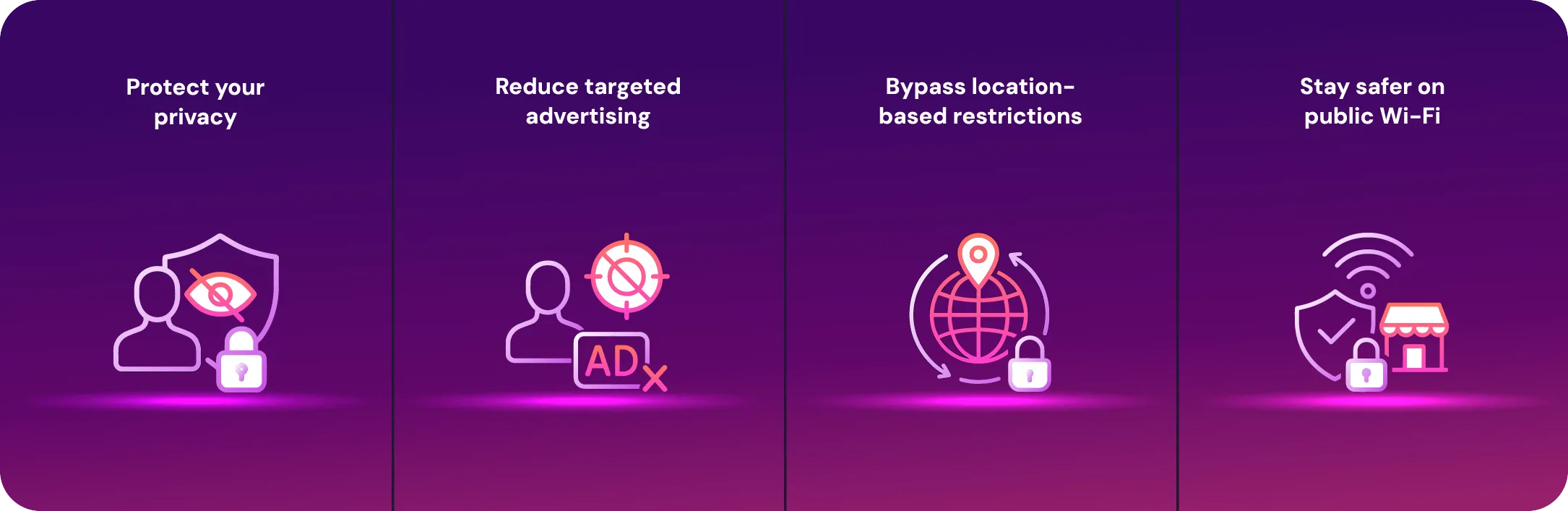
Now that you know a VPN is capable of hiding your IP address, you might ask – why should you hide your IP address in the first place? What’s the point of it, and how can it benefit you?
Protect Your Privacy
- Your IP address may look like a random set of numbers, but it reveals a lot, including your approximate location and internet service provider (ISP).
- Websites and third parties can use it to link your online activities back to you.
- A VPN replaces your real IP with one from its server, making it much harder for anyone to connect your activity to your identity.
Reduce Targeted Advertising
- Advertisers track you across sites using your IP address to build detailed profiles about your interests, habits, and location.
- This data fuels those eerily specific ads that follow you everywhere online.
- By hiding your IP, you break part of this tracking chain, limiting how much advertisers can learn about you.
Bypass Location-Based Restrictions
- Some websites and streaming platforms block access based on your IP’s country.
- A VPN lets you connect through a server in another location, so sites think you’re browsing from there.
- This is especially useful if you’re traveling and want to access services from your home country.
Stay Safer on Public Wi-Fi
- Public Wi-Fi networks are often unencrypted and easy targets for cybercriminals.
- If attackers get your IP, they can attempt to intercept your data.
- A VPN hides your IP and encrypts your traffic, turning any stolen data into unreadable gibberish.
Search History
When you surf the web without a VPN, all your activities are visible to whoever wishes to look. Websites often track your behavior while you browse them. By doing this, they can build detailed profiles of you. These profiles are often shared or sold to third parties without your knowledge.
As your IP address is your identifier, it can easily be used to track back what websites you visited and what you did there. The same rule applies to search engines, too. These services tend to keep your search history and use this information for targeted advertising and other purposes. Besides that, your ISP can easily see what you searched for and what websites you visited.
Thankfully, a VPN comes in as a guardian once again. When you use a VPN, all of your internet traffic is encrypted. Anything that you do online becomes invisible to everyone – your favorite website, your ISP, all the search engines, and anything else online.
Since these activities are now hidden, keeping your search history is impossible. In turn, this means that a VPN hides your search history.
Does VPN Hide Browsing History From WiFi Owner?
Your internet connection does not come out of thin air. It is provided to you by your ISP – the internet service provider. Effectively, as it gives you access to the internet, it becomes your WiFi owner, and that can be troublesome.
Since your internet connection is established via the infrastructure owned by your ISP, any and all data can be intercepted. In simpler terms, your ISP can see all your online activities and all information related to them. This includes the websites you visit, how long you stay on them, how much data you use, what content you interact with, and so on.
Having all this information on the table means revealing your browsing history to the WiFi owner, compromising your privacy. Neither your ISP nor anyone else should know about your activities online, and there is a way to make this true.
A VPN encrypts all your traffic, making your activities and browsing history invisible to the WiFi owner. When a VPN is on, the most your ISP can see is that your connection is going to a VPN server. Hide your activity from your ISP today, now for only $2.99/mo!
From that point on, everything is blank. It’s like your internet activities are disappearing into a black hole. This prevents the WiFi owner from snooping on you and from knowing your browsing history because your internet habits are no one’s business!
Why Hide Your Browsing History From ISPs?
Your ISP is the gateway to everything you do online, and without protection, it can see it all. Here are the key reasons to keep your browsing history private from your ISP:
Protect Your Privacy
- Your ISP can monitor every site you visit, what you search for, the videos you watch, and even how long you spend on each page.
- This is essentially like having someone follow you around 24/7, taking notes on your activities.
- A VPN encrypts your internet traffic, making these details invisible to your ISP.
Prevent Data Selling
- Many ISPs log and store your browsing history, then sell this data to advertisers and data brokers for profit.
- These companies can use it to build detailed profiles about your habits, interests, and location.
- By hiding your browsing history with a VPN, you deny ISPs access to the valuable information they could sell.
What Does a VPN Not Hide?
While a VPN is a powerful tool for protecting your online privacy, there are several situations where it cannot keep your activity or information hidden:
- Your identity on logged-in accounts: Logging into websites like Google, Facebook, or Amazon reveals who you are. A VPN encrypts your traffic and hides your IP address, but it can’t conceal the personal information you voluntarily provide.
- Your GPS location: VPNs only affect internet traffic and IP addresses; they don’t control device GPS signals. Apps with GPS access can still track your location even when connected to a VPN.
- Your online purchases: While your IP address is hidden and your traffic is encrypted, any purchase made with personal information (name, address, credit card details) remains visible to the shopping site. VPNs can’t hide the data you willingly provide to complete transactions.
Although a VPN is a powerful tool, it’s essential to be mindful of the situations where even a VPN won’t keep your information totally confidential.
Can a VPN Be Tracked?
If you are using a reliable VPN, it is incredibly unlikely that it can be tracked. Good VPNs take privacy and security very seriously, constantly updating and adding new under-the-hood things that make your activities invisible.
In most cases, if a VPN is somehow tracked, it is usually a free VPN. Free VPNs lack security features, technical expertise, and other things that make a VPN reliable and impossible to track. There’s also a possibility that the free VPN itself tracks your activities and sells your data to third parties for profit.
Now, even the best VPNs are not perfect, and in some rare cases, VPN protection could fail. Firstly, a connection to the VPN server can drop unexpectedly due to weak signal, bad servers, and other factors. This leaves you vulnerable until the connection is reestablished. Fortunately, though, VPNs often come with a kill-switch feature, which disconnects you from the internet in case a VPN connection drops.
Another scenario is DNS leaks. These occur when your device sends DNS requests (the things that translate a URL into an IP address) through your ISP rather than the VPN server. In this case, your browsing history can leak, despite your VPN connection.
Finally, some mobile apps choose to ignore VPN connections altogether. Even if you are connected to a VPN on your smartphone, the app could choose to send data outside of the VPN tunnel (via mobile data or GPS), exposing your IP address and location.
How To Choose a VPN for Privacy
If you want superb internet privacy, check that your potential VPN provider is reliable.
- A strict no-logs policy: You must ensure the VPN doesn’t collect/store your data.
- Strong encryption: If your VPN offers protocols like WireGuard, that’s a good sign.
- A kill switch: To prevent any accidents, check if the VPN has a kill switch feature that blocks your internet access in case the VPN connection drops.
- Place of business: Look for a VPN that is based outside of the 5/9/14 Eyes alliances (e.g., Switzerland, Panama, British Virgin Islands).
- Legal details: Check if your potential VPN has a clear and transparent privacy policy and anonymous payment options (such as cryptocurrencies).
- Supportive customer support team: If you run into any issues, a swift and caring response from customer support is priceless!
On that note, looking far for a provider like this is unnecessary if you’ve ended up on our Mysterium VPN blog. We check all these boxes, and we’re an excellent choice for a VPN provider focused on your online privacy.
Conclusion
So, does a VPN hide your location? Absolutely. By masking your real IP address and encrypting your data, a VPN makes your online presence virtually untraceable.
Whether you want to keep advertisers, ISPs, or snooping websites from knowing where you are, using a trustworthy VPN is essential. Just remember, not all VPNs are created equal.
Choose a secure provider like Mysterium VPN to protect your privacy and browse freely, and enjoy a safer, borderless internet experience wherever you go.


Reclaim the internet that took you at your word!
Get Mysterium VPN

Frequently Asked Questions
Gintarė is a cybersecurity writer at Mysterium VPN, where she explores online privacy, VPN technology, and the latest digital threats in editorial pieces. With hands-on experience researching and writing about data protection and digital freedom, Gintarė makes complex security topics accessible and actionable.
Related Articles
.png)