VPN for Mac in 2026 for Speed, Privacy & Ease of Use

Protect your Mac with Mysterium VPN – route your traffic through our decentralized infrastructure and enjoy peace of mind.
  • Over 7,500+ residential IPs in 100+ countries.
  • Native app for laptops running macOS 12.0 or later.
  • Download straight from the Mac App Store.
shield icon
up to 30-day money-back guarantee
Available on:
android icon windows icon apple icon mac icon chrome icon
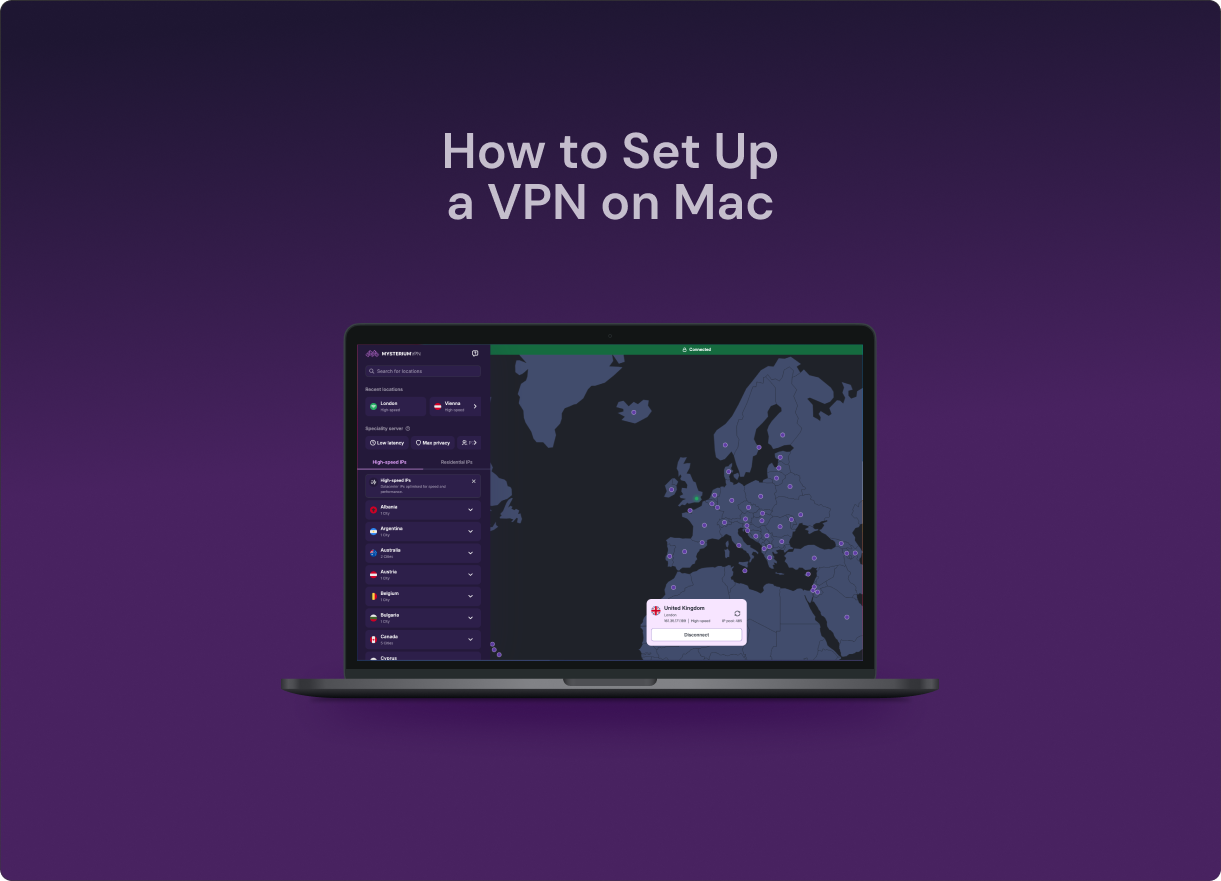
An image of a Mac running the Mysterium VPN desktop app

Why Choose Mysterium VPN for Mac

Mysterium VPN is a reliable VPN app for Mac, built on a decentralized infrastructure. We offer 11,000+ IPs (7,500+ residential IPs) across 100+ countries, so your connection blends in like normal home traffic rather than being flagged as a VPN.
  1. A black and white icon of a laptop with a checkmark on it
    1. 
    Mysterium VPN works on laptops running macOS 12.0 or later.
  2. An icon of a shield
    2. 
    Decentralized infrastructure, no central point of failure.
  3. An icon of a piece of paper
    3. 
    No-logs design with WireGuard and end-to-end encryption.
  4. A black and white toggle on icon
    4. 
    Kill switch and DNS leak protection look out for you at every step.
  5. An icon of multiple tech devices
    5. 
    Protect 15 devices with a single account, from $2.99/mo.

Do You Need a VPN on Mac?

A common misconception is that Macs don't get hacked, so there's nothing to worry about. That's not how privacy works. macOS protects your actual device from many threats, but it does nothing to protect your internet connection.

Without a VPN, your ISP logs every website you visit and can sell that data to advertisers. On public Wi-Fi (at a coffee shop, hotel, or airport), anyone on the same network can intercept your unprotected traffic. And if you travel or work remotely, geo-restrictions can block the content and tools you rely on.

Get an Affordable VPN for Mac

up to 30-day money-back guarantee
2-Yeararrow icon
Basic
$10.49
/mo
Get Basic Plan

$10.49 billed every month

VAT may apply
  • pro markerSecure and high-speed VPN
  • pro markerSecure 6 devices at a time
  • pro marker57 supported countries
  • pro marker7-day money-back guarantee
  • con markerResidential IPs
  • con markerCity-level choices
  • con markerMalware blocker
Best Value
Plus
$13.49
/mo
Get Plus Plan

$13.49 billed every month

VAT may apply
  • pro markerSecure and high-speed VPN
  • pro markerSecure 10 devices at a time
  • pro marker100+ supported countries
  • pro marker7-day money-back guarantee
  • pro marker7,500+ residential IPs
  • pro markerCity-level choices
  • con markerMalware blocker
Save 67%
Pro
$18.49
/mo
Get Pro Plan

$18.49 billed every month

VAT may apply
  • pro markerSecure and high-speed VPN
  • pro markerSecure 15 devices at a time
  • pro marker100+ supported countries
  • pro marker7-day money-back guarantee
  • pro marker7,500+ residential IPs
  • pro markerCity-level choices
  • pro markerMalware blocker
Save 56%
Basic
$3.69
/mo
Get Basic Plan

$100.64 $44.28 billed every year

VAT may apply
  • pro markerSecure and high-speed VPN
  • pro markerSecure 6 devices at a time
  • pro marker57 supported countries
  • pro marker7-day money-back guarantee
  • con markerResidential IPs
  • con markerCity-level choices
  • con markerMalware blocker
Best Value
Save 68%
Plus
$4.29
/mo
Get Plus Plan

$160.88 $51.48 billed every year

VAT may apply
  • pro markerSecure and high-speed VPN
  • pro markerSecure 10 devices at a time
  • pro marker100+ supported countries
  • pro marker7-day money-back guarantee
  • pro marker7,500+ residential IPs
  • pro markerCity-level choices
  • con markerMalware blocker
Save 67%
Pro
$6.99
/mo
Get Pro Plan

$254.18 $83.88 billed every year

VAT may apply
  • pro markerSecure and high-speed VPN
  • pro markerSecure 15 devices at a time
  • pro marker100+ supported countries
  • pro marker7-day money-back guarantee
  • pro marker7,500+ residential IPs
  • pro markerCity-level choices
  • pro markerMalware blocker
Save 75%
Basic
$2.59
/mo
Get Basic Plan

$251.76 $62.16 billed every 2 years

VAT may apply
  • pro markerSecure and high-speed VPN
  • pro markerSecure 6 devices at a time
  • pro marker57 supported countries
  • pro marker30-day money-back guarantee
  • con markerResidential IPs
  • con markerCity-level choices
  • con markerMalware blocker
Best Value
Save 78%
Plus
$2.99
/mo
Get Plus Plan

$323.76 $71.76 billed every 2 years

VAT may apply
  • pro markerSecure and high-speed VPN
  • pro markerSecure 10 devices at a time
  • pro marker100+ supported countries
  • pro marker30-day money-back guarantee
  • pro marker7,500+ residential IPs
  • pro markerCity-level choices
  • con markerMalware blocker
Save 74%
Pro
$4.79
/mo
Get Pro Plan

$443.76 $ 114.96 billed every 2 years

VAT may apply
  • pro markerSecure and high-speed VPN
  • pro markerSecure 15 devices at a time
  • pro marker100+ supported countries
  • pro marker30-day money-back guarantee
  • pro marker7,500+ residential IPs
  • pro markerCity-level choices
  • pro markerMalware blocker
Available on:
android icon windows icon apple icon mac icon chrome icon

How to Get Mysterium VPN on Mac

  1. Step 1
    1

    Step 1

    Choose a plan for your needs. Plus is our most popular, get it now for $2.99/mo.
  2. Step 2
    2

    Step 2

    Download the Mysterium VPN app for your device. Available for laptops, smartphones, tablets, and browsers.
  3. Step 3
    3

    Step 3

    Sign in, select a country, and connect. You're now browsing securely from wherever you choose.
Get Mysterium VPN

What to Look for in a Mac VPN?

Mysterium VPN was built by a team of cybersecurity experts, and it works seamlessly on your Mac. Here are the Mysterium VPN features that make it worth it:
PREMIUM RESIDENTIAL IPS

PREMIUM RESIDENTIAL IPS

Browse with our network of 7,500+ residential IPs for Mac. Your traffic looks natural, so websites have no reason to block it.

WIREGUARD / OPENVPN PROTOCOL

WIREGUARD / OPENVPN PROTOCOL

Modern protocols made for secure, efficient connections. Fast and battery-friendly on Mac.

NO-LOGS POLICY

NO-LOGS POLICY

We don't store your browsing activity on our decentralized network. Less data collected means stronger privacy and nothing for anyone to request later.

KILL SWITCH

KILL SWITCH

If your VPN drops for even a second, the kill switch cuts your internet until it's back up. Your real IP never leaks by accident.

MALWARE BLOCKER

MALWARE BLOCKER

Suspicious and malicious domains get blocked while you browse. One more layer between you and unsafe websites.

UP TO 15 DEVICES

UP TO 15 DEVICES

One subscription protects 15 devices – your iPhone and iPad, Mac, plus Android, Windows, and Chrome devices, all at the same time.

An illustration of a Mac laptop with Mysterium VPN installed on it

How to Set Up a VPN on Mac

  1. Download app: Get it directly from the Mac App Store or our website.
  2. Install: Open the file and follow the on-screen instructions. macOS may ask you to allow a network extension – click Allow.
  3. Log in: Open the app and sign in with your Mysterium VPN account.
  4. Choose a server: Browse by country or let the app auto-select a server.
  5. Connect: Click the Connect button. A green menu bar confirms your connection is live.

That's it. Your Mac is safe.

background image blur mobile
background image mobile

Frequently Asked Questions

What is the best VPN for Mac?
The best VPN for Mac balances privacy, speed, and reliability. Mysterium VPN is a strong option, offering residential IPs, end-to-end encryption, a strict no-logs policy, and support for WireGuard and OpenVPN. These fast, secure protocols work smoothly on macOS, making it suitable for everyday browsing, streaming, travel, and remote work.
Do I need a VPN on my MacBook?
Yes, even though Macs have a strong reputation for security, they don't protect your internet traffic by default. Without a VPN, your ISP can monitor your browsing, and anyone using the same public Wi-Fi (at a café, airport, or hotel) could intercept your data. A VPN encrypts your connection and masks your IP address, which is essential for anyone who values privacy.
Is there a free VPN for Mac that actually works?
Free VPNs for Mac exist, but you shouldn't use them. They have poor security features, a small number of server locations, and some have historically logged and sold browsing data to third parties. Stick with a paid but affordable option like Mysterium VPN.
How do I set up a VPN on macOS?
First, choose a VPN provider and create an account. Download the macOS app from the provider's website or the Mac App Store. Open the app and log in with your credentials. Select a server location and click Connect. You'll see a VPN icon in your Mac menu bar confirming the connection is active.
What VPNs are compatible with macOS Sonoma?
Most major providers support macOS Sonoma, including NordVPN, ExpressVPN, Surfshark, ProtonVPN, and Mysterium VPN. Check that the app was updated within the last six months — older versions may have permission issues with Apple's latest security framework.
Will a VPN slow down my Mac?
A VPN adds a small amount of overhead to your connection since it encrypts your traffic and routes it through a server. Premium VPNs using protocols like WireGuard typically reduce speeds by less than 10–15%, which is barely noticeable. Cheap or free VPNs can be significantly slower. If speed is a priority, choose a server geographically close to your location.
Does Mac have a built-in VPN?
macOS includes native VPN support, but it only supports older protocols (IKEv2, L2TP, Cisco IPSec) that require manual server configuration. It’s not a full VPN service; you still need a VPN provider to supply server credentials. For most users, downloading a VPN app like Mysterium VPN is far simpler and offers better performance, a kill switch, and automatic connection on public Wi-Fi.
© Copyright 2026 UAB "MN Intelligence"