What's Inside the World's Open Buckets: A Mysterium VPN Research



There is a quiet assumption behind most of the internet: that the data you hand to a company is locked away somewhere safe. Yet, the reality is that an already significant and increasingly growing share of it is not locked away at all, sitting in open cloud storages that are one anonymous web request away from spilling all your data to whoever requested.
We have spent a long time arguing that centralizing data into a single hackable repository is a design choice with predictable consequences, and this time we brought a census to back it up. Our research team analyzed a large-scale index of publicly listable cloud storage across Amazon S3, Google Cloud, Azure, DigitalOcean, and Alibaba, queried on 24 May 2026 against an underlying index current as of 25 March 2026.
And yet the findings are not a surprise to anyone who understands what centralized cloud storage actually is. 19.6 billion is a number that deserves to be documented in full, because the danger is not in any single file but in how they chain together.
Key Takeaways
- 19.6 billion files are currently exposed across 535,480 publicly listable cloud buckets on Amazon S3, Google Cloud, Azure, DigitalOcean, and Alibaba, with no login and no break-in required.
- 685,047 credential and key files (.env files, private keys, password vault databases) are sitting in open buckets, giving would-be attackers direct access to live systems rather than merely exposing data from those systems.
- 985,645 .sql files and 733,040 .bak files expose entire databases as downloadable files, stripped of the application-layer protections that normally guard them.
- Over 764,015 files bear the word "secret" in their filename, with 250,563 containing "salary," 195,475 containing "kyc," and 124,967 containing "credentials." Files named "password," "passport," "invoice," and "backup" each exceed 1 million.
- The cause is structural, not accidental: centralized storage guarded by a single permission setting means one misconfigured toggle exposes everything at once.
How We Conducted the Research
A "bucket" is a folder in the cloud. Companies use them to store everything, including website images, app data, backups, logs, and customer records. Each bucket has a permission setting that controls who can see its contents.
Set to private, only the owner can access it. Set to allow public listing, anyone who knows or guesses the address can see a directory of every file inside and frequently download them, with no password and no authentication required.
Our research team analyzed buckets in this second state: publicly listable, browsable by anyone. We examined five major cloud platforms and counted file metadata across the following categories: credential and key files, database exports and backups, virtual disk images, email mailbox archives, and filename keyword signals.
The index covers 535,480 buckets. Every figure in this report is a count of file metadata, not file contents. The presence of these file types in open storage is itself the finding, and an alarming one.
The Scale of What's Exposed
The population spans 535,480 buckets across five platforms, with a distribution that reflects where the industry has concentrated its infrastructure.
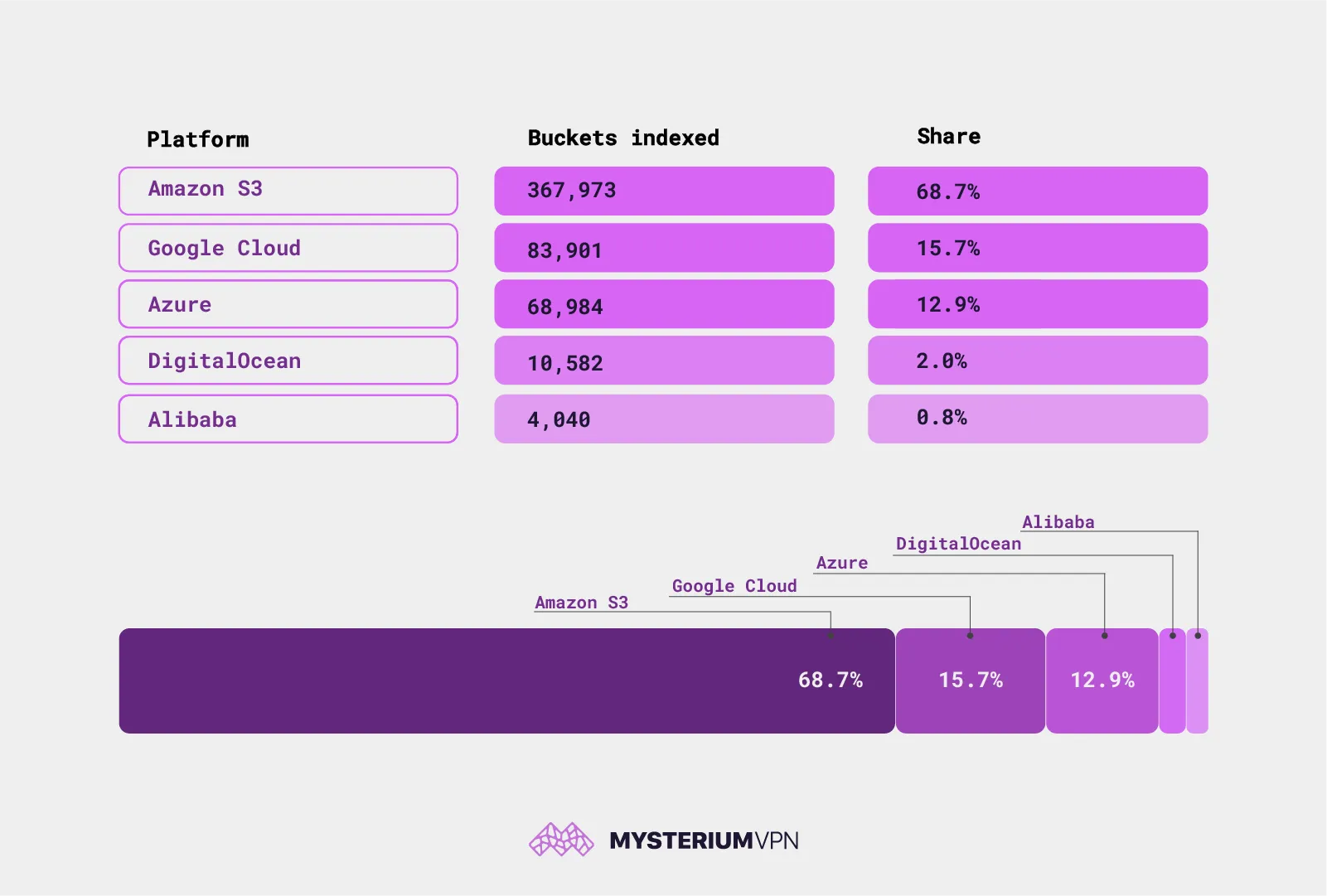
Disclaimer: Data was captured in March 2026.
More than two-thirds of exposed storage sits on AWS. Not because S3 is less secure than the alternatives, but because it is the default choice for most of the world, and defaults are where mistakes scale.
The lesson here is not "avoid Amazon." It’s that exposure follows wherever the crowd goes. When one platform hosts the majority of the world's cloud workloads, it also hosts the majority of the world's misconfigured ones.
The Files That Should Never Be Reachable
Most of those 19.6 billion files are mundane: images, documents, archives, the digital lint of the internet. The question worth asking is how much of the exposure consists of the kind of material that should never be reachable by a stranger. The answer, counted precisely by file type, is sobering.
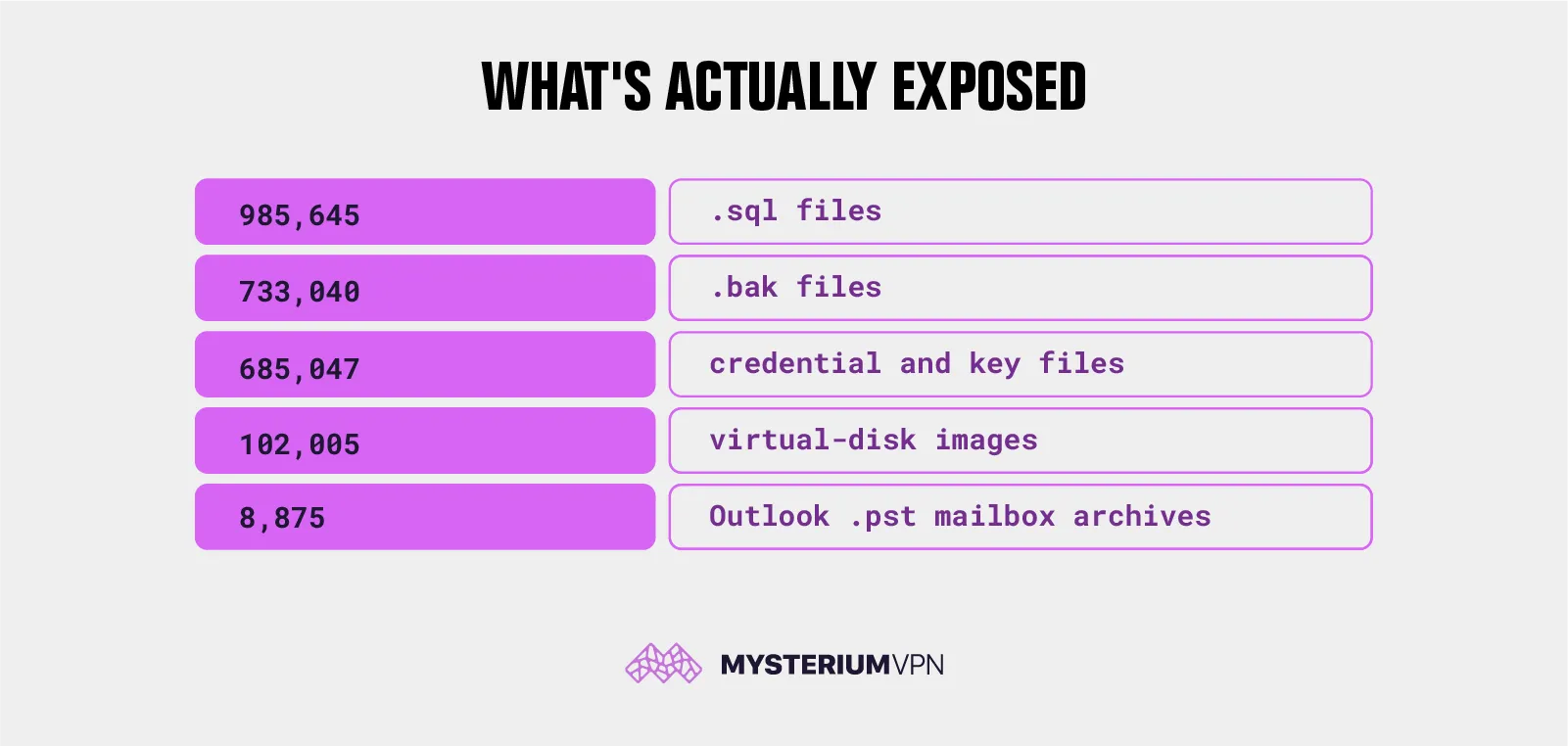
Credential and Key Files: 685,047
These are .env files, private keys, certificates, keystores, and VPN configuration files. An .env file is where an application keeps its secrets: database passwords, payment-processor API keys, the master tokens that let the software do its job. A private key is the cryptographic proof that a server is who it claims to be. A .kdbx file is literally a password manager's vault.
The danger is that these files hand over the credentials to go and take all of it, directly, from the live system, with no further steps required. Our previous research on publicly exposed .env files found over 12 million IP addresses with accessible environment configuration files across the web, underscoring how persistent this failure pattern is. The open buckets in this census add another layer: the same files, now sitting inside storage that is directory-browsable by anyone.
Database Exports and Backups: 985,645 .sql Files and 733,040 .bak Files
A .sql file is usually a database export. A .bak file is a backup. Together they represent the richest single target an attacker can find: entire databases, lifted out of the running system and saved as a file, with customer names, addresses, order histories, support tickets, and, far too often, passwords in plain text or as hashes that can be cracked offline at leisure.
A live database is guarded by the application wrapped around it. Meanwhile, a database dump sitting in an open bucket just like this is the same data with all the guards removed, downloadable in one click, and analyzable forever.
Virtual Disk Images: 102,005
These are .vmdk, .vdi, .ova, .iso, and .vhd files: snapshots of entire computers. Not a file from a server, but the whole server, frozen and saved, with operating system and applications and stored data all together.
An attacker who downloads one can boot it up privately, take it apart at their own pace, and harvest everything inside, including credentials baked into the machine that then unlock other systems. One exposed disk image can be the thread that unravels an entire network.
Outlook Mailbox Archives: 8,875
A .pst file is a complete Outlook mailbox export: every email sent and received, plus contacts and calendar entries, in a single file. The count here is small precisely because each one is so heavy with consequence.
A full mailbox is a goldmine for fraud. It reveals who talks to whom, how invoices are approved, and what deals are in flight. That is exactly the material used to craft convincing business-email-compromise scams and targeted phishing, and it is also, frequently, deeply personal.
This kind of exposed communication data feeds directly into the credential-stuffing and account-takeover pipelines documented in the 150 million login leak, where attackers chain one exposed data source into access across dozens of accounts.
What the Filenames Signal
By filename alone, we found 764,015 files containing "secret," 250,563 containing "salary," 195,475 containing "kyc," 124,967 containing "credentials," and 49,307 marked "confidential." A filename does not guarantee what is inside, but people do not label files "kyc," the identity documents collected for know-your-customer checks, or "confidential" by accident. These are signposts pointing at the most sensitive material people store.
For the broadest categories, our count stops at one million per query, so the true figures run higher still: files literally named "password," "passport," "invoice," and "backup" each clear that ceiling. Essentially, it’s a standing population, replenished faster than it is ever cleaned up.
How an Attacker Actually Chains These Files
As we explained in the beginning of this article, the real danger is not single files butt how they chain together. A realistic sequence looks like this:
Someone scanning open buckets finds an .env file. Inside are database credentials. Those credentials open a .sql backup sitting in the same bucket, which contains a customer table with email addresses and password hashes, with the hashes being cracked offline.
Many people reuse passwords, so a fraction of them now unlock email accounts, which contain password-reset links to everything else. Meanwhile, a .pst mailbox from the same organization reveals the finance team's invoice-approval routine, which becomes the script for a six-figure wire-fraud email that looks entirely legitimate.
None of those steps required breaking anything. Each one used data that was simply left readable. That is the quiet horror of bucket exposure: it turns ordinary misconfiguration into a complete attack kit, pre-assembled and waiting to be put into action.
One Checkbox Is Not a Security Architecture
There is no exploit in this story. No zero-day, no malware, no clever intrusion. Every file in this census is exposed because of a setting. A bucket flipped to "list" instead of "private." A nightly backup script pointed at the wrong target. A developer who committed an .env file to the wrong place.
Underneath the human error is a structural one: centralization. Data gets pooled into a single store, guarded by a single setting, so that one wrong toggle exposes everything at once. A backup is only a catastrophe when it is a complete backup in a single place. A credential file only unlocks the kingdom when the kingdom is centralized behind it. The 19.6 billion files we counted are the predictable output of an architecture that concentrates data and trusts a checkbox to protect it.
But what’s worse is that this is not a new observation. It is the same failure documented repeatedly across different contexts: a platform promises security, pools data into a central repository, and eventually a misconfiguration or a breach proves that the promise was marketing copy sitting on top of an unprotected database. Yet, for one reason or another, most seem to never learn.
What You Should Do
Most of the data in this census is not yours to fix. It is about you, sitting in storage owned by companies you have done business with: a shop, an app, a clinic, an employer. You never chose the setting that exposed it, and you cannot go in and change it.
That shifts where you spend your effort: from trying to control storage you do not own to shrinking your exposure and limiting the blast radius when someone else's bucket inevitably leaks.
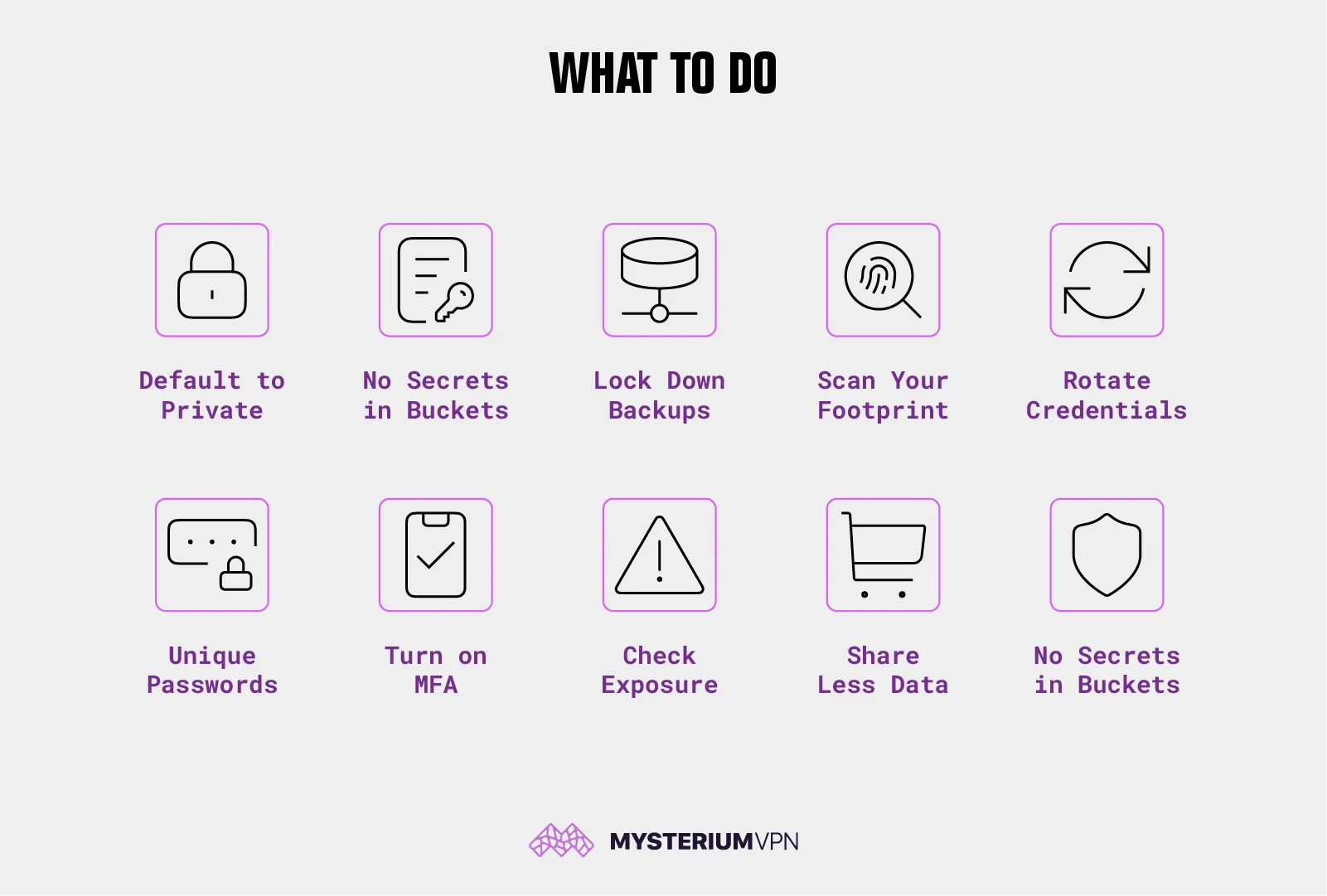
If you run any cloud storage:
- Default to private, always. Treat any bucket that allows public listing as a misconfiguration until proven otherwise. Most cloud providers now offer an account-wide "block public access" switch, and turning it on costs nothing.
- Never store secrets in object storage. .env files, private keys, and credentials do not belong in a bucket, ever. Use a dedicated secrets manager, and keep encryption keys somewhere other than next to the data they protect.
- Lock down backups. Database dumps and disk images are the highest-value targets in this entire report. Encrypt them, restrict who can read them, and never write them to a public path "just for a minute."
- Scan your own footprint periodically, the way an outsider would. If you can list a bucket without logging in, so can everyone else.
- Rotate credentials regularly and operate as though a copy of your data has already escaped, because for a great many organizations in this census, it has.
For everyone else:
- Use a unique password everywhere, backed by a password manager. When an exposed .sql dump leaks one of your passwords, unique passwords stop the damage at that one account instead of cascading across your whole life.
- Turn on multi-factor authentication on everything that touches money, email, and identity. A leaked password is far less useful to an attacker when a second factor stands behind it.
- Check whether you are already exposed. Free breach-notification services let you see whether your email has appeared in known leaks, so you can change those passwords now rather than after the fact.
- Share less, with fewer services. Every company you hand data to is another bucket that might one day be left open. Decline the optional fields. Use guest checkout. The data that was never collected can never leak.
- Protect the data trail you can control. You cannot fix a company's storage settings, but you can keep your own activity from becoming one more pooled, trackable record. Mysterium VPN encrypts your connection and routes it through a distributed network of residential nodes rather than a single centralized server, so your browsing is not pooled into one more central repository waiting to be misconfigured. It will not unlock someone else's bucket on your behalf, and no honest tool can. What it does is shrink the footprint that is genuinely yours to shrink.
The Bigger Picture
This census is what centralization looks like in the negative: half a million buckets, billions of files, and a sensitive core measured in the hundreds of thousands, exposed not by attackers but by the decision to pool data in one place and trust a setting to guard it.
The safest data is the data that was never gathered into one hackable repository to begin with. That principle is why Mysterium is built the way it is, distributed by design, with no central trove of user activity to leak, lose, or leave public by accident.
The open buckets in this report will keep accumulating faster than they are cleaned up. The filename counts alone prove it. The organizations responsible for these buckets should be treating misconfiguration as a structural failure, not an occasional mistake to patch. And if they will not, their users should be shrinking the footprint those organizations can expose on their behalf.
Methodology
Our analysis draws on a large-scale index of publicly listable cloud storage across the major cloud providers (underlying index current as of 25 March 2026, queried 24 May 2026). This is a count-and-categorize study: every figure is a count of file metadata, not file contents. No exposed file, bucket, or record was accessed, downloaded, or republished, and no owner is named.
Keyword figures reflect filenames, not verified contents, and may include false positives. We make no geographic claims: a bucket's cloud region reflects datacenter location, not the data owner's country. All figures are a point-in-time snapshot, with the underlying index re-released periodically. We intend to track these numbers over time.


Be part of the resistance, quietly.
Get Mysterium VPN
Dominykas is a technical writer with a mission to bring you information that will help you keep your digital privacy and security protected at all times. If there's knowledge that can help keep you safe online, Dominykas will be there to cover it.
Related Articles