- Blog >
- News >
- Nearly 5 Million Web Servers Found Exposing Git Metadata – Study Reveals Widespread Risk of Code and Credential Leaks
Nearly 5 Million Web Servers Found Exposing Git Metadata – Study Reveals Widespread Risk of Code and Credential Leaks



Git has been the most widely used version control system among developers worldwide to coordinate coding projects ever since its founding by Linus Torvalds. However, its public nature also makes it a treasure trove for misuse. Publicly accessible .git folders keep surfacing across the internet and can turn even minor software deployment mistakes into potentially catastrophic security incidents with just a few clicks.
A 2026 internet-wide data study conducted by the Mysterium VPN research team found that 4,964,815 IP addresses – essentially, 5 million web servers – had their Git repository metadata accessible. Put simply, 5 million web servers with misconfigured settings left internal files publicly accessible. Far more concerning is that 252,733 .git/config files contained deployment credentials within the configuration file itself – this, of course, creates a direct path from misconfiguration to a hostile takeover.
The pattern isn’t new: Git is ubiquitous, developers regularly redeploy web servers, and hidden directories can end up inside public document roots. The scale, however, remains problematic because even a single exposed .git directory enables attackers to reconstruct source code, discover secrets, and launch numerous follow-up attacks.
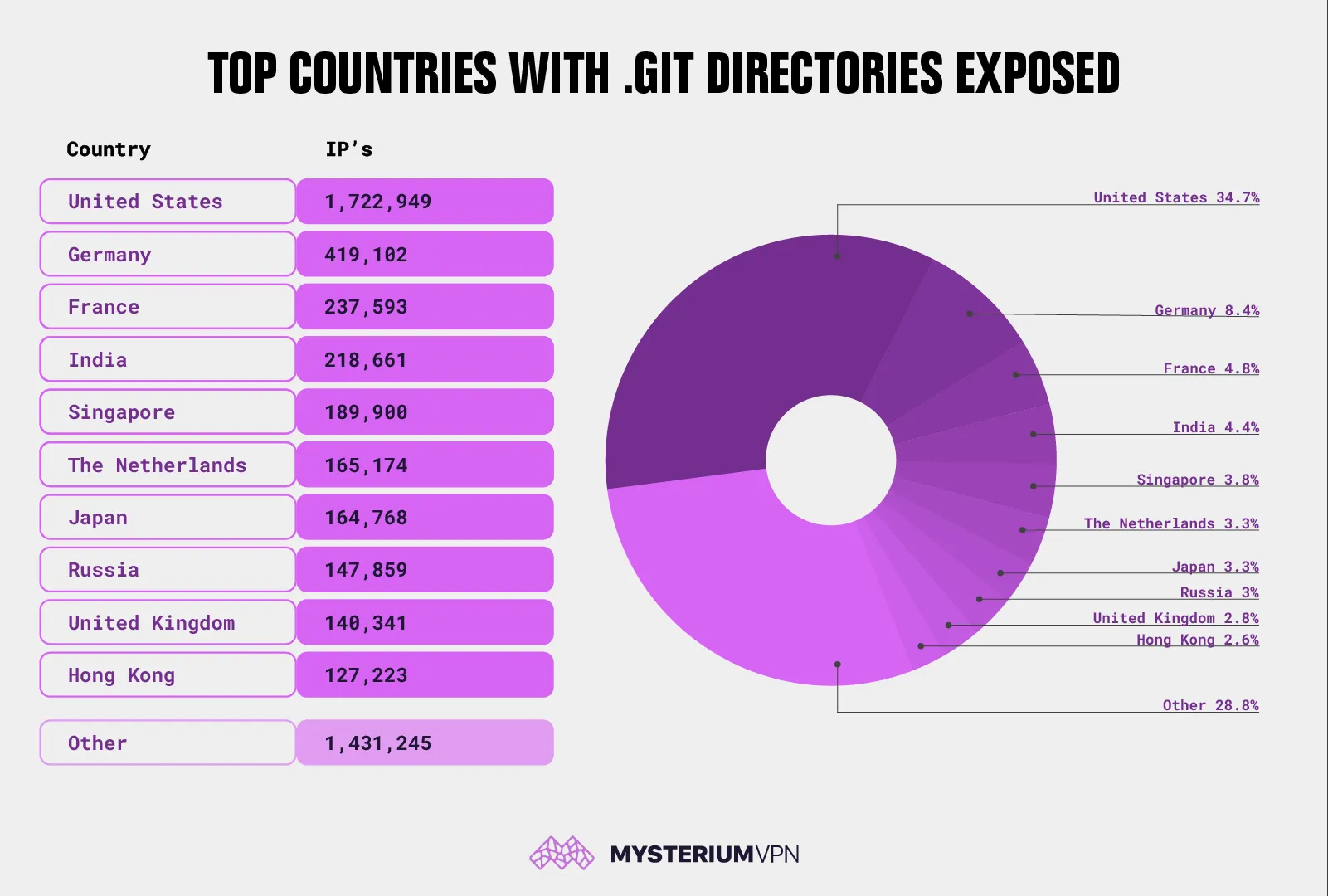
Key Takeaways
- Number of IP addresses found with publicly accessible .git structures: 4,964,815;
- .git/config files with deployment credentials inside the config: 252,733 (~5.09%);
- Countries with the most websites found vulnerable include the United States with 1,722,949 IPs (~34.70%), Germany (419,102 IPs), France (237,593 IPs), India (218,661 IPs), Singapore (189,900 IPs), The Netherlands (165,174 IPs), Japan (164,768 IPs), Russia (147,859 IPs), United Kingdom (140,341 IPs), and Hong Kong with 127,223 IPs.
What an Exposed .Git Folder Reveals
A Git repository isn’t just a working directory with source code. It also contains a hidden folder called .git that stores everything needed to track changes and store secrets. Git’s own documentation and educational materials describe how its systems are detailed enough that someone could access secret parts of the web server that contain private databases and other sensitive information if breached.
If a .git folder is accessible through a web browser, the risk isn’t limited to a single file. In many cases, attackers can request a handful of well-known paths, like /.git/HEAD, /.git/config, and /.git/index, which act as a roadmap to how the website is structured and configured. – and then reconstruct the website’s content using widely available tools. This allows them to study how a website works internally, identify weaknesses, and uncover hidden secrets, such as API keys, internal service credentials, or configuration secrets, which can then be exploited further.
the 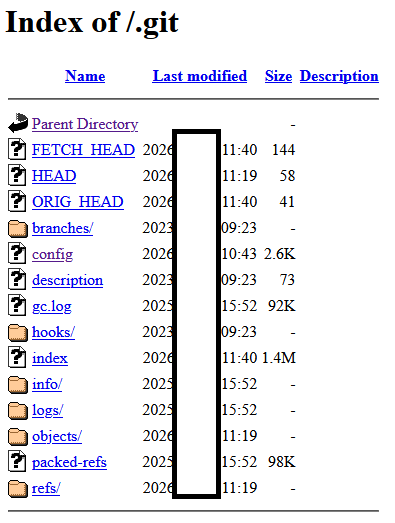
Screenshot example with the .git directory exposed
Why .Git/Config Is Key
One file in particular, .git/config, is especially dangerous when exposed, as it stores repository configuration values, including remote definitions (for example, remote "origin"), fetch rules, and URLs to remote repositories. Git documentation explicitly references .git/config as a configuration file location and describes Git configuration behavior.
In routine deployment pipelines, credentials end up inside remote URLs more often than many teams realize, especially with legacy patterns such as:
- Basic authentication embedded in a URL;
- Automation accounts created for CI/CD that are reused across environments;
- Temporary access tokens that were meant to be rotated but weren’t.
The Mysterium VPN research team’s data indicates 252,733 cases where deployment credentials were present inside .git/config, which is the difference between “exposed metadata” and “direct unauthorized access.”
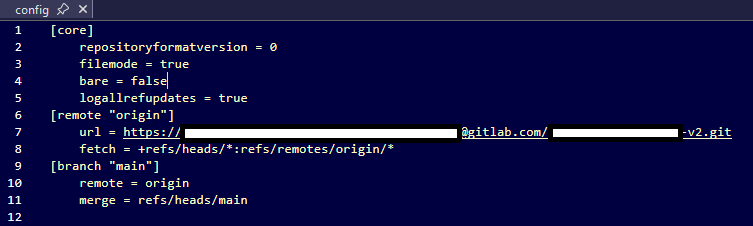 Screenshot example with the .git/config file exposed
Why This Mistake Keeps Happening
Here’s why these hidden .git folders keep ending up online:
- The whole project gets uploaded by mistake: Sometimes developers copy their entire project folder to the live website without realizing the hidden .git folder (which stores sensitive information) goes live too.
- Hidden files get included in packaging tools: When teams use tools to bundle up their website files, those tools can accidentally include hidden folders that were never meant to go public.
- Security settings miss a spot: Developers often protect their main website address, but hackers can still access hidden files through alternate routes (like the raw server IP or a different domain), especially if those paths weren’t locked down the same way.
- Servers don’t block hidden folders by default: Many web servers don’t automatically block access to hidden folders. Developers must manually block it; otherwise, it’s wide open to everyone.
OWASP’s (a nonprofit that works to improve software security) testing guidance highlights that deployment and configuration mistakes can expose sensitive files that were never meant to be public.
What the Geographic Distribution Tells Us
Out of the nearly 5 million public servers that expose Git metadata, the USA leads by a wide margin, with 1,722,949 IPs; this is consistent with the country’s outsized share of global hosting capacity and cloud deployments. Similar to earlier reporting on exposed .git folders, the United States remains the most significant part of the puzzle.
Germany, France, the Netherlands, and the UK reflect Europe’s strong hosting footprint and regulated data residency requirements that often keep workloads in-region. Singapore and Hong Kong frequently appear in internet exposure studies because they serve as high-density hosting and transit hubs for APAC workloads.
The geographic distribution of vulnerable IPs shows where exposed servers are hosted, not where companies that own these websites are headquartered. Hosting concentration, cloud region preference, content delivery architecture, and shared hosting density all shape this distribution.
Risks Possible by Exposed .Git Metadata
An exposed .git directory isn’t a single point of vulnerability. Instead, it’s a gateway to multiple attack paths, depending on what’s found in the repository and configuration.
#1: Source Code Reconstruction and Vulnerability Discovery
If attackers can reconstruct source code, they can:
- Identify hard-coded secrets and API keys;
- Find unpatched libraries and known weak spots;
- Locate admin routes, debug endpoints, and feature flags;
- Extract private business logic and proprietary IP.
Security incident reports regularly show that exposed .git folders make it easier for attackers to understand a website and exploit it effectively.
#2: Credential Reuse and Repository Takeover
When login credentials are exposed inside .git/config, the risk goes beyond information leakage. In these cases, attackers may gain direct access to the underlying code repository. Depending on the permissions of the exposed credentials, attackers may be able to:
- Pull access to private repositories;
- Push access, enabling malicious commits;
- Tag manipulation, release poisoning, or supply chain tampering.
This kind of access can be used to inject malicious code and manipulate software delivered to users. Basically, the end user interacts with a website that’s been tampered with.
#3: Supply Chain and Downstream Compromise
Repository access is frequently the start of a supply chain incident:
- Malicious commits are added to a dependency or shared component;
- Backdoored JavaScript shipped to production sites;
- CI/CD workflows modified to exfiltrate secrets during builds.
In these cases, attackers don’t need to break into live servers; they simply corrupt the code before it is deployed.
#4: Internal Infrastructure Mapping
Even if attackers can’t fully rebuild the website, exposed Git data can still reveal sensitive internal details, such as:
- Remote hostnames and repository providers;
- Branch naming conventions and internal project structure;
- Commit author identities and email patterns (useful for phishing);
- Artifact paths and deployment scripts that reference internal services.
This information helps attackers plan more targeted and convincing attacks.
#5: Lateral Movement Into Cloud and Third-Party Services
A common escalation path is “code to cloud”:
- An exposed repository contains an API key;
- The API key grants access to a storage bucket, database, or message queue;
- The attacker pivots into production data.
OWASP’s guidance on sensitive exposure issues highlights that the potential impact frequently exceeds the original misconfiguration.
What Should You Do?
Addressing exposed .git folders requires two parallel efforts: containing the exposure and securing any credentials that may have been leaked.
The priority is to immediately block public access to Git metadata. Web servers should be configured to deny all requests to hidden .git paths entirely. The goal is to ensure that no files inside .git can be read through a web browser under any circumstances.
Blocking access alone isn’t enough. The best thing you can do is to ensure that .git directories never exist in production web roots. Instead of deploying a complete working repository, teams should deploy only the files required to run the site, such as build artifacts or container images. Production environments shouldn’t contain Git history or metadata.
If there’s any indication that credentials were stored in .git/config, those credentials should be treated as compromised. This includes rotating or revoking access tokens, resetting passwords for automation or service accounts, and reviewing logs for unusual repository or API activity. Where possible, access should be reissued with limited permissions and short lifetimes to reduce future risk.
Finally, organizations can reduce the chance of repeat incidents by adding preventative controls to their development workflows. Scanning tools can help detect passwords or access keys before they’re committed to code. At the same time, pre-commit checks and automated build failures can stop sensitive data from entering repositories in the first place. Centralized secrets management should be used to keep credentials out of code entirely.
How Organizations Can Check Exposure Safely
A practical approach for authorized teams is to test their own domains and IP ranges:
- Check for HTTP 200 responses on known .git paths (for example, .git/HEAD or /.git/config).
- Verify server configuration blocks hidden directories across:
- Primary domains;
- Alternate hostnames;
- Direct-to-IP access paths.
- Search historical deployment artifacts and confirm .git isn’t being published.
OWASP’s web security testing guidance supports structured reviews of deployments and of unreferenced files, as these issues often persist across environments.
Why a “5% Credential Exposure” Rate Is Concerning
The data gathered by the Mysterium VPN team of researchers shows that just over 5% of exposed /.git/config files contained deployment credentials. At first glance, that number might seem small, but in reality, it points to a widespread bad habit.
Many teams assume that .git/config is harmless technical metadata, yet in practice, it often contains passwords, access tokens, and other sensitive credentials due to everyday shortcuts in deployment workflows.
From a risk perspective, that 5% figure matters. When exposure is measured across millions of servers, even a small percentage translates meaningfully into hundreds of thousands of live credentials. These exposures also aren’t evenly spread: some organizations will have especially powerful tokens with broad access, dramatically increasing the potential impact.
The fact that attackers don’t need to find these cases manually only makes everything worse. Once a .git/config file is publicly visible, credential discovery can be fully automated, making large-scale harvesting fast and cheap. This is why security research and incident reports consistently show that leaked credentials cause far more damage than source code exposure alone – they don’t just reveal how systems work; they provide direct access to them.
How Teams Can Avoid This Mistake Going Forward
Preventing exposed .git folders doesn’t require advanced tools or sweeping changes. In most cases, it comes down to setting a few clear rules, keeping sensitive information out of public reach, and being ready to respond quickly if something goes wrong.
Set Up Rules for What Should Never Be Public
Make sure the server blocks access to hidden folders like .git, .svn, .env, and backup files – these often contain sensitive info. Don’t just protect your website’s main address; also lock down any backdoors, such as direct IP links or alternate domains.
Keep Sensitive Info Out of Your Code
Instead of putting passwords or secret keys directly in your files, store them in secure places (like a secret manager or environment settings). Use .gitignore to make sure secret files don’t get included when code is saved or shared. Remember that this doesn’t remove anything that’s already saved.
Watch for Red Flags
Set up alerts to notify you if someone tries to access hidden .git files. Keep an eye out for unusual Git activity, such as someone unexpectedly downloading or uploading code.
Be Ready in Case Something Slips Through
Have a plan for quickly changing passwords or keys if they ever leak. Keep track of all the accounts and keys your systems use, especially the ones used in automated build and deployment processes.
Ultimately, exposed .git folders are a reminder that small configuration mistakes can have outsized consequences. Ongoing vigilance, basic hygiene, and clear ownership of deployment practices go a long way toward preventing avoidable security incidents.
Conclusion
A 2026 study conducted by the Mysterium VPN research team found that nearly 5 million public web servers were exposing Git repository metadata. This configuration mistake allows attackers to reconstruct website source code, steal credentials, and compromise downstream systems. In more than 250,000 cases, exposed .git/config files contained active deployment credentials, turning a simple oversight into a direct path to unauthorized access.
The findings highlight a widespread issue caused by deployment practices, inconsistent server configuration, and misplaced assumptions about safety. While the presence of exposed Git metadata alone is dangerous, the inclusion of credentials dramatically increases risk, enabling repository takeover, supply chain attacks, and access to cloud infrastructure.
The research underscores that even small percentages of credential exposure become severe at the internet scale and that attackers can automate discovery with ease. Addressing the issue requires not only blocking access to the folders but also removing Git metadata from production entirely, improving coding hygiene, and adding preventative controls throughout the software development lifecycle.


Reclaim the internet that took you at your word!
Get Mysterium VPN

Gintarė is a cybersecurity writer at Mysterium VPN, where she explores online privacy, VPN technology, and the latest digital threats in editorial pieces. With hands-on experience researching and writing about data protection and digital freedom, Gintarė makes complex security topics accessible and actionable.
Related Articles
.png)