- Home >
- The Residential VPN Built for Streaming >
- VPN for BBC iPlayer


The Best VPN for BBC iPlayer That Actually Works
- Reliable residential IPs from 4 UK cities for reliable access.
- No ISP throttling for smooth and lag-free streaming.
- Private internet access to protect your BBC iPlayer account.


Why Mysterium VPN Is Best for BBC iPlayer?
Streaming platforms work best with connections that resemble real users. Mysterium VPN provides UK residential IPs, which behave like everyday home connections, delivering reliable performance and minimal interruptions. Here’s what you get:
- Residential UK IPs that blend in naturally with UK users.
- IP leak protection ensures your information is safe.
- Robust encryption to safely use streaming sites.
- No ISP throttling for quick-flowing internet traffic.
With our VPN connection, you can enjoy consistent performance backed by years of expertise, during which we made our VPN compatible with popular streaming services. Stay private, stay connected, and stream BBC iPlayer without hassle.
How to Use a VPN to Watch BBC iPlayer?
-
 1
1Step 1
Choose a plan for your needs. Plus is our most popular, get it now for $2.99/mo. -
 2
2Step 2
Download the Mysterium VPN app for your device. Available for laptops, smartphones, tablets, and browsers. -
 3
3Step 3
Sign in, select a country, and connect. You're now browsing securely from wherever you choose.
Why is BBC iPlayer Not Working With a VPN?
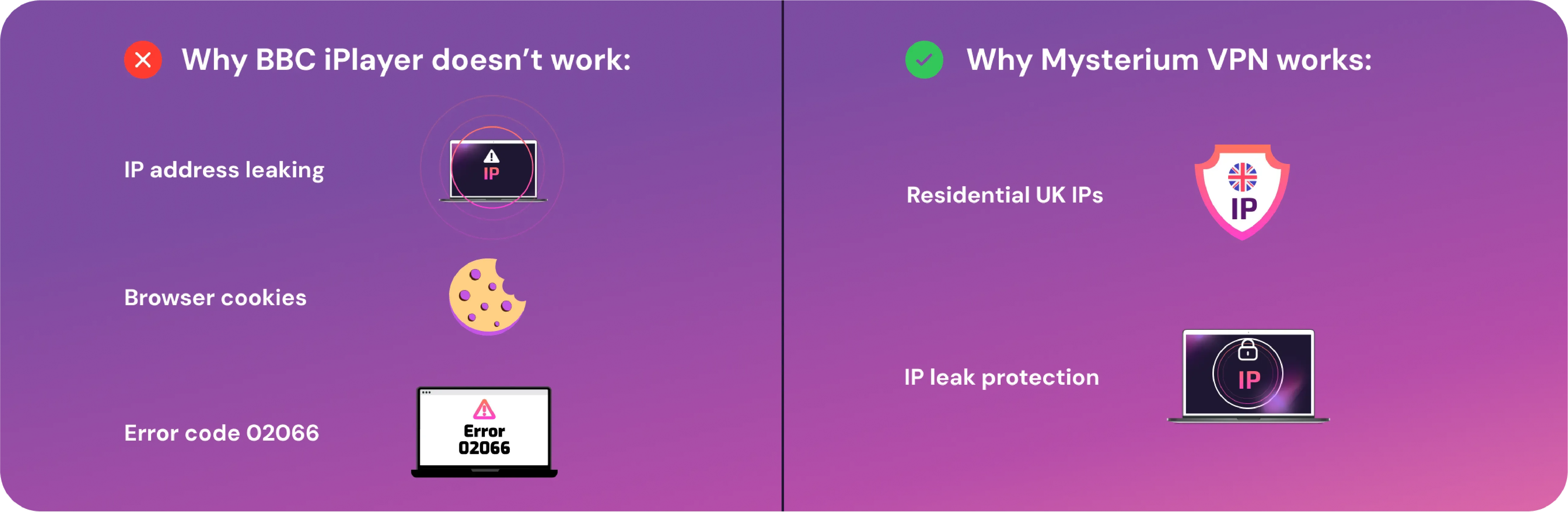
BBC and other popular streaming platforms won’t sit by when customers use VPNs to access their services. That’s why it relies on a system that identifies IP addresses linked to data center servers and blocks them automatically. Recently, these identification and blocking efforts have increased, and as a result, many popular VPNs no longer work reliably with BBC iPlayer.
With Mysterium VPN, you can choose between data center and 7,500+ residential IPs, which make you appear like a regular UK user rather than a data center bot. This distinction is crucial, enabling you to watch your favorite shows seamlessly, flying under the radar.
IP Address Leaking
If your VPN connection accidentally leaks your real IP address, platforms will detect it and block it within seconds. To prevent this from happening, your Mysterium VPN subscription comes with automatically enabled leak protection, ensuring you remain secure and hidden from view.
Browser Has Tracking Cookies
If you’ve previously tried to watch iPlayer without vpn protection, your browser may store tracking cookies tied to your real IP. This can cause blocks even when you reconnect through a VPN. The fix is simple – you need to clear your cookies and cache, then try again.
This issue is common across many streaming services like IPTV, not just BBC iPlayer. The good news is that the fix remains the same for all of them – get rid of those old cookies!
How to fix BBC iPlayer Error Code 02066
Error code 02066 typically shows up when BBC iPlayer discovers you’re using a VPN connection. Common fixes for this error include the following steps:
- Clearing cookies and cache from your browser.
- Switching to a different browser or streaming device.
- Refreshing your IP by connecting to a different server.
- Opt for a residential IP instead of the datacenter ones.
Residential IPs are actually the most effective way to avoid encountering this error. Using Mysterium VPN’s residential IPs dramatically reduces the risk of triggering the identification system to prevent this error in the first place. With Mysterium VPN, you can enjoy your favorite shows without hiccups, now 78% off!
Is it Legal to Use a VPN to Watch BBC iPlayer?
VPNs are legal in the UK and are widely used to improve online privacy, protect against cyber threats, and keep your data secure. Using a VPN for safety or security is perfectly fine and doesn’t break any laws.
However, according to the BBC iPlayer Terms of Service, you mustn’t access content outside the UK with the help of a VPN. Doing so could lead to restrictions or even a ban on your BBC account. The ToS explicitly prohibits “using a VPN service so you can watch BBC iPlayer when you're outside the UK” or helping others to do the same.
Mysterium VPN doesn’t condone breaking the BBC’s ToS, and we recommend always respecting platform rules. If you’d like to learn more about using VPNs with other streaming services, we invite you to check out our VPN streaming guides, where we review multiple platforms and their compatibility with VPNs.
List of BBC iPlayer-Supported Devices
The iPlayer app and website work across various devices, allowing you to watch your favourite TV programmes and movies on the go. Here's a detailed list of supported devices and how you can access iPlayer on each:
| Name | Device Type | Model/Type/OS Requirements |
| Apple Devices | ||
| iPhone | Smartphone | iOS 15.5 or above (app); iOS 12.5.5 or above (aebsite) |
| iPad | Tablet | iPadOS 15.5 or later (app) |
| Mac | Computer | Access via browser (website) |
| Apple TV | Smart TV | tvOS 17.0 or later (app) |
| Android & Windows Devices | ||
| Android | Smartphone | Android 7.0 or above (app); Android 9 or above (website) |
| Windows PC | Computer | Access via browser (website) |
| Smart TVs | ||
| Samsung TV | Smart TV | Most models (app) |
| LG TV | Smart TV | Most models (app) |
| Sony | Smart TV | Models up to 2023 (app) |
| Panasonic | Smart TV | Most models (app) |
| Xiaomi | Smart TV | Most models (app) |
| Hisense | Projector/TV | Most models (app) |
| Gaming Consoles | ||
| PlayStation | Gaming console | PS5, PS4 (app) |
| Xbox | Gaming console | Xbox One; Xbox Series S; Xbox Series X (app) |
| Set-top / Streaming Devices | ||
| Vodafone | Set-top box | DTIW384 VF UK (app) |
| Roku | Streaming device | Most models (app) |
This table covers the most relevant and widely used devices compatible with BBC iPlayer. Whether using a mobile, tablet, computer, or smart TV, ensure your device meets the minimum OS requirements for the best streaming experience.
How Does a VPN Make BBC iPlayer Think I Am in the UK?
Every device connected to the internet is assigned a unique IP address, which reveals its general geographic area. As such, BBC iPlayer determines its location primarily through your IP address – if your IP isn’t from the UK, iPlayer blocks you.
Using Mysterium VPN solves this by hiding your real IP and routing your traffic through a server located in the UK. From iPlayer’s perspective, your device now appears inside the UK.
While data center IPs are often detected and blocked, residential UK IPs (which Mysterium VPN offers) blend in naturally with regular user traffic. This makes streaming more reliable and less likely to trigger BBC iPlayer’s blocks.

Can I Use a Free VPN for BBC iPlayer?
No, using a free VPN for BBC iPlayer (or any other purpose) isn’t a good idea. Here’s why:
- Small number of VPN servers: Free VPNs don’t have the resources to offer users many VPN servers, meaning you’ll likely be blocked from the BBC iPlayer.
- Inadequate security features: Free VPNs simply can’t afford to ensure their security features are enough to protect your sensitive information online.
- Annoying ads: Most platforms make money by selling ad space, so free VPNs are likely to fill your screen with ads, disrupting streams.
- Poor performance: Free VPNs often come with slow speeds, throttling, and bandwidth caps, making smooth streaming nearly impossible.
For strong privacy and smooth playback, stick with Mysterium VPN, now 78% off!