How to Change Your Facebook Location Easily in 2026


Key Takeaways
- Facebook tracks location through multiple overlapping signals — GPS, IP address, Wi-Fi/Bluetooth proximity, profile details (Current City/Hometown), photos, and check-ins — meaning disabling just one won't fully hide your location.
- Manual settings changes (Current City, Marketplace location, Dating location) only affect what Facebook shows you within the platform — they don't change your IP address, so location-based tracking by advertisers and other services continues regardless.
- A VPN addresses the gap manual settings leave, masking your IP so your apparent location changes more comprehensively across ads, Marketplace, Dating, and general browsing — plus adding encryption as a side benefit.
- This is legal, but Facebook's Terms of Service still prohibit deceptive use, such as impersonation or misleading others about your identity — changing location for privacy, travel, or broader browsing is fine, but not for deceptive purposes.
Do you ever feel like your Facebook feed thinks you're living in the wrong city, or even the wrong country?
Whether you're traveling, relocating, or just want better control over what you see and who sees you, changing your Facebook location can be a powerful move.
In this Mysterium VPN article, we’ll walk you through everything you need to know about how and why to change your location on Facebook in 2026.
Why Change Location on Facebook?
There are several reasons why someone might want to change their location on Facebook.
And no, it’s not just for hiding from that awkward high school acquaintance who keeps tagging you in pyramid schemes. Here’s a quick overview of the most common reasons to change your Facebook location!
- Improved content relevance: Want local news, events, and group recommendations that actually match your interests? Updating your location helps Facebook show you what’s relevant.
- Marketplace browsing: You can find better deals or rare items by browsing item listings in other cities or regions.
- Facebook Dating flexibility: Expand your dating pool to new cities or countries.
- Ad targeting: See ads tailored to your current or preferred location instead of irrelevant and annoying promotions.
- Privacy control: Some Facebook users prefer to hide or mask their real location for personal security or peace of mind.
- Travel or relocation: You can update your location to reflect your actual whereabouts when you move to a new place or take extended trips.
- Digital nomad lifestyle: If you’re working remotely and moving around frequently, it makes sense to update your digital footprint to reflect your real-time location.
- Language and cultural content: Want to see posts, groups, or events in another language or from another culture? A location change can help.
- Testing user experience: Some marketers and developers change location to test how content or ads appear in different regions.
- Local regulations or content restrictions: If certain features or content are region-specific, changing your location might unlock a better experience.
How Does Facebook Track Your Location?
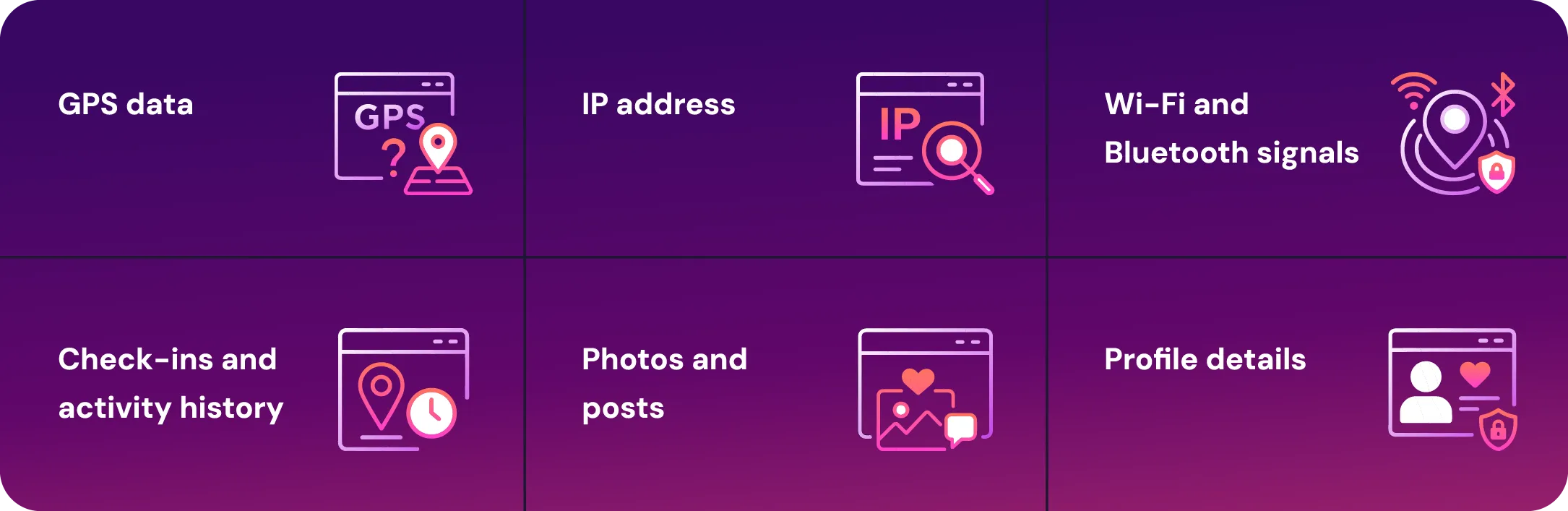
You might be surprised by how many ways Facebook can determine where you are. It's not just about checking in at a cool restaurant or tagging your vacation spot. Facebook has multiple tracking methods that run in the background.
- GPS data: If you use the mobile app and have location services enabled, GPS data constantly feeds Facebook your coordinates.
- IP address: Even if GPS is off, your IP address can give away your approximate location.
- Wi-Fi and Bluetooth: Nearby networks and signals can also infer location.
- Your profile details: The “Current City” and “Hometown” sections in your profile are considered.
- Photos and posts: Uploading a picture from a specific place or tagging a location can inform Facebook where you are.
- Check-ins and activity history: Manual check-ins or frequent logins from certain places also create location footprints.
How Facebook Uses Your Location
Facebook doesn’t just use your location to help you check in at your favorite brunch spot—it collects and leverages that data across the platform.
Whether you're searching for nearby events, exploring Facebook Dating, or browsing Marketplace listings, Meta uses your location to customize your experience.
- To personalize content and ads: Facebook uses your general and precise location to serve location-specific ads, group suggestions, and content.
- To power features like Marketplace and Events: These rely heavily on knowing your whereabouts to show relevant listings and activities.
- To support friend suggestions, Facebook might suggest people who live nearby or have checked into the same places.
- For security and login verification, Facebook tracks login locations to detect suspicious activity.
Is a VPN Necessary To Change Location?
No, a VPN isn’t strictly necessary to change your Facebook location. Facebook allows you to manually change your location within certain parts of the platform, like your profile’s “Current City” or your settings in Marketplace and Dating.
However, there are limits to what this can do. For instance, it doesn’t change your IP address, which still tells Facebook (and other websites) where you're accessing it from.
This is where a VPN for Facebook comes in. Using a VPN masks your IP address, allowing you to appear as if you're browsing from another city or country. This can influence what you see across Facebook, including ads, groups, and local content. It also adds a layer of encryption to your internet traffic, giving you much more privacy.
Using Facebook’s built-in location settings is quick and easy, and it’s totally free. However, those changes are limited to within Facebook’s platform and don’t impact the data that apps and advertisers collect from your device.
How To Change Your Facebook Location With a VPN
Using a VPN is the most seamless way to adjust your location on Facebook across all features—from Marketplace to Dating and everything in between. Here’s how to do it based on your preferred device.
Android
- Download and install the Mysterium VPN app from the Google Play Store.
- Launch the app and sign in or create an account.
- Choose a VPN server in the location where you want to appear.
- Connect to the specific server.
- Open the Facebook app and use it as usual. Your virtual location is now different.
iOS
- Install the Mysterium VPN app from the App Store.
- Launch the app and set up your account.
- Select your preferred region or city.
- Tap to connect.
- Once connected, open the Facebook app and enjoy browsing with your new location.
PC or laptop
- Download and install Mysterium VPN for your Windows, Mac, or Linux device.
- Open the app and set up your account.
- Pick the location from which you want to appear.
- Click “Connect.”
- Open Facebook in your browser. Your IP location will now reflect your VPN settings.
How To Change Location on Facebook Marketplace
Facebook Marketplace listings are tied to your current location, but you can browse different regions either by using a VPN or by manually changing your account settings.
Change Location With VPN
- Connect to a Mysterium VPN server based in your desired region.
- Open Facebook and navigate to Marketplace.
- Listings should now be filtered according to your VPN-based location.
Change Location via Settings
- Open Facebook and go to Menu > Marketplace.
- Click or tap on your location displayed at the top.
- Type in the name of the city or enter a postal code.
- Set your preferred radius to refine search results.
How To Change Location on Facebook Dating
Looking for love outside your zip code? Maybe Cupid has a better aim in another city.
Whether you’re traveling, relocating, or just want to see who’s out there in a different region, Facebook Dating lets you shake things up by changing your location.
No passport is required; just a few taps or a trusty VPN are needed.
Change Location With VPN
- Launch Mysterium VPN and connect to your target location.
- Open the Facebook app and access Facebook Dating.
- Profiles will now be shown based on your virtual location—who knew true love could be just one server away?
Change Location via Settings
- Open Facebook Dating.
- Tap the gear icon to access settings.
- Select "Location."
- Enter your desired city or ZIP code.
- Save your changes and get ready to swipe into a whole new scene.
How To Change Primary Location on Facebook
Changing your primary location can help to improve your Facebook profile so friends, groups, and suggestions match your interests and current life situation better. Here’s how you can do that!
- Visit your Facebook profile.
- Click or tap "Edit Profile."
- Scroll to the “Details” section, click “Edit”.
- Find “Current City,” and click the pencil icon to edit.
- Enter your new location and save changes.
How To Change Location on Facebook Events
If you're attending an event and want to see what's happening in your area, make sure your Facebook location settings are up to date. You can also search for events by entering a specific city or region in the search bar.
This is super handy if you're traveling and want to find local activities. No one wants to miss a street fair or taco festival just because Facebook thinks they’re still at home, right?
- Open the event page on Facebook.
- At the top of the screen, click “Near me”.
- Type the name of the city or region you want.
- Explore events from your chosen location.
How To Change Check-in Location on Facebook
Do you want to share your location with friends? Here’s how to do it:
- Start a new Facebook post.
- Tap or click on “Check In.”
- Search for and select your desired location.
- Add a caption and share the post.
Is It Legal To Change Your Location on Facebook?
Yes, it is legal to change your location on Facebook, whether manually or with the help of a VPN. People do it all the time to reflect on a move, travel, or simply to protect their privacy.
However, what’s important is that your use of Facebook – and any tools like our very own Mysterium VPN – remains within legal and ethical boundaries.
Facebook’s Terms of Service prohibit misleading behavior or impersonation, so it’s essential not to use false location data to deceive others.
Using a VPN like Mysterium, which is currently 85% off, is legal in most countries, and it provides a legitimate way to enhance your privacy and browsing experience on Facebook and beyond.
Wrapping It Up
Digital borders are easier to cross than physical ones, and knowing how to control your location on Facebook is a big part of owning your online identity.
Whether you’re chasing privacy, a soulmate, or travel deals, your location settings matter more than you think.
Remember, Facebook’s tools give you surface-level control, but if you want deeper privacy and broader flexibility, a VPN like Mysterium VPN helps you stay in control without giving up your digital freedom. It’s like carrying your own private internet bubble, wherever you go.


Save up to 85% off for Black Friday!
The ultimate digital shield, now at a fraction of the cost.

Frequently Asked Questions
Gintarė is a cybersecurity writer at Mysterium VPN, where she explores online privacy, VPN technology, and the latest digital threats in editorial pieces. With hands-on experience researching and writing about data protection and digital freedom, Gintarė makes complex security topics accessible and actionable.