Is ChatGPT Safe? Key Insights and Considerations for Users


Key Takeaways
- ChatGPT is a powerful AI tool developed by OpenAI, capable of generating text, code, ideas, and more, but like any online service, it comes with privacy and security considerations.
- OpenAI implements strong security measures, including encryption, access controls, monitoring, and third-party audits, yet no platform is completely immune to data breaches, misuse, or scams.
- Key risks include phishing, fake ChatGPT apps, data exposure, misinformation, and malicious use of AI-generated content, meaning users must stay cautious about what they share and what they trust.
- You can improve your safety by using strong passwords, enabling two-factor authentication, avoiding sensitive data sharing, verifying information, and adding an extra layer of protection with a VPN like Mysterium VPN.
Artificial intelligence has come a long way since its early beginnings in the 1980s. Today, tools like ChatGPT are woven into our everyday lives, helping us answer late-night questions, draft emails, brainstorm ideas, and even plan our week.
But as AI becomes more powerful and accessible, cybersecurity concerns grow alongside it. While ChatGPT offers impressive convenience, it’s important to understand the privacy risks, data security realities, and smart safety practices that come with using it.
In this article, we’ll break down how ChatGPT works, what security measures are in place, the risks you should be aware of, and how to use it more safely in different situations.
Is ChatGPT Safe From Hackers?
ChatGPT itself uses encrypted connections and internal security controls to reduce the risk of external attacks. However, no online platform is completely immune to hacking attempts.
The real vulnerability often lies in:
- Weak user passwords
- Phishing emails targeting ChatGPT logins
- Fake ChatGPT apps designed to steal credentials
- Reused passwords from previous data breaches
If someone gains access to your account, they may view your chat history or attempt identity-based attacks. Enabling two-factor authentication (2FA) is one of the most effective ways to protect your account from hackers.
Is ChatGPT Safe for Kids?
ChatGPT is officially available to users aged 13 and older. While it includes moderation systems, it is not designed for unsupervised young children.
Parents should be aware that:
- AI responses may occasionally be inaccurate or biased
- Children may receive information that is too advanced or inappropriate
- Overreliance on AI may affect independent thinking skills.
Supervised use, parental controls, and discussions about responsible AI usage are strongly recommended.
Is ChatGPT Safe for Confidential Information?
Short answer: No, you shouldn't treat ChatGPT as a confidential vault.
Although OpenAI applies encryption and data protection measures, user prompts may be stored and reviewed for service improvement, depending on account type and settings.
Avoid sharing:
- Financial details;
- Login credentials;
- Medical records;
- Legal documents;
- Trade secrets;
- Sensitive company data.
If confidentiality is critical, use enterprise-grade tools with stronger data controls, and even then, follow company compliance policies.
Is ChatGPT Safe to Use on iPhone?
Yes, if downloaded from the official Apple App Store.
The main risks come from:
- Fake apps pretending to be ChatGPT;
- Jailbroken devices;
- Public Wi-Fi usage without protection.
Using updated iOS software, strong device passwords, and secure networks significantly reduces risk.
Is ChatGPT Safe to Give Your Phone Number?
ChatGPT may require a phone number for verification during account setup.
While this is standard for many online services:
- It does connect your identity more directly to your account;
- It may increase phishing exposure if your number is leaked elsewhere.
To minimize risk:
- Use strong account security
- Avoid reusing phone numbers tied to sensitive services
- Be cautious of SMS-based phishing attempts
Is It Safe to Upload a Resume to ChatGPT?
Uploading a resume is generally low-risk, but not risk-free.
A resume typically contains:
- Full name;
- Email address;
- Phone number;
- Work history;
- Education background.
While this information is often publicly available (e.g., LinkedIn), uploading it still creates a stored data record. Best practice is to remove unnecessary personal details before uploading. Also, avoid including ID numbers, home addresses, or sensitive references.
Is It Safe to Download Files from ChatGPT?
Downloading files directly from the official ChatGPT website or app is generally safe. OpenAI does not intentionally distribute malware or harmful files through its platform.
However, the real risk doesn't usually come from ChatGPT itself; it comes from how the file is used afterward or from fake third-party websites pretending to be ChatGPT.
If you download files from unofficial sources, clones, or suspicious websites claiming to offer “premium ChatGPT downloads,” you could expose your device to malware. That’s why it’s important to verify you are using the legitimate platform before downloading anything.
You should also be cautious when downloading and running AI-generated code. While the output itself isn’t malicious by default, executing code without reviewing it can introduce security vulnerabilities to your system.
To stay safe, always download files from the official ChatGPT platform, scan files with antivirus software if necessary, and avoid running scripts or executable files unless you understand what they do.
ChatGPT Security Measures
"OpenAI is dedicated to safeguarding computing efforts that advance artificial general intelligence. Our responsibility to prepare for emerging security threats to users, customers, and global communities shapes everything we do," proudly claims the data security portion of the OpenAI website.
And they're not lying. OpenAI supports its customers’ compliance with privacy laws, including the GDPR and CCPA, and offers a Data Processing Addendum for customers.
Its API, ChatGPT Enterprise, ChatGPT Team, and ChatGPT Edu products have been examined by independent third-party vendors to confirm that its controls meet industry standards for security and confidentiality.
Here are a few highlights of how ChatGPT and OpenAI care for your sensitive data:
- Access control: OpenAI imposes strict access controls on its models and data to only authorized individuals within the organization to prevent data breaches and unauthorized access.
- Encryption: Communication and data storage related to ChatGPT and other OpenAI models are encrypted to protect against unauthorized interception or access.
- Monitoring and logging: OpenAI monitors ChatGPT responses and usage and responds to any unusual or unauthorized activity.
- Regular audits and assessments: The creators of ChatGPT conduct regular security audits and assessments to identify and address potential risks.
- Collaboration with security researchers: OpenAI collaborates with the broader security research community, encouraging responsible disclosure of identified vulnerabilities.
How To Use ChatGPT Safely
Okay, now that you know that ChatGPT security is not a perfect system, it's time to learn how to exercise caution and use ChatGPT safely, dodging malicious actors and privacy violations while you get help with your English essay or look for gift ideas.
Here are some tips and tricks to protect your sensitive data and prevent any ChatGPT security risks:
- Avoid fake websites and apps: Always interact with ChatGPT via its official website or app, downloading it from secure channels like Chrome, Google Play, or Apple's App Store.
- Secure your account with a strong password: Use a complex and random password and consider using a password manager. It's a basic step in self-preservation, but it's still valuable.
- Don’t share personal information or content: Your chat history with ChatGPT isn't private, so avoid sharing sensitive data and confidential information such as your financial details, payment details, login credentials, etc.
- Use an anonymous account: Consider using an anonymous account to interact with ChatGPT for an added digital privacy barrier.
- Cross-check the information and be aware of bias: The AI model reflects the opinions and biases of its training data that ChatGPT collects, so always cross-check the information with a reliable source to avoid falling for and spreading misleading information accidentally.
- Report issues: Provide feedback to OpenAI if you encounter any issues, biases, or inappropriate behavior with ChatGPT. The OpenAI website is a reliable source of help with the AI model.
- Disable chat history: Is ChatGPT confidential? No. This means that your conversation history is up for grabs for both company executives and malicious actors. To protect yourself and your private information, it's recommended that you either disable or regularly delete the historical data through the Data Controls section of the settings.
Use a VPN: This one shouldn't surprise anyone. Using a VPN for ChatGPT is a superb way to take extra steps to safeguard your private information. From your biology test to the doctor's note you asked to have explained, your private information matters.
Understanding ChatGPT Limitations
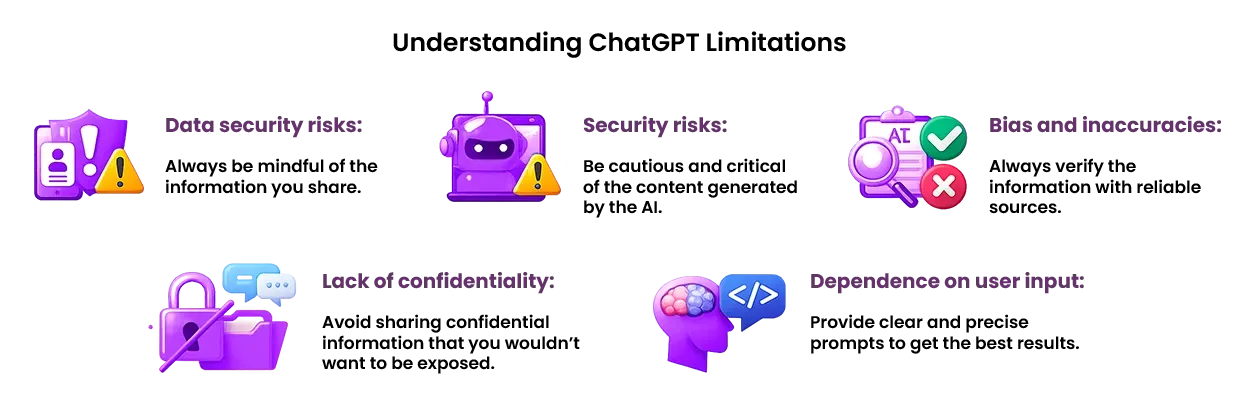
While ChatGPT is a powerful tool, it’s essential to understand its limitations to use it effectively and safely:
- Data security risks: ChatGPT stores user data, including chat history, which can be vulnerable to data breaches and unauthorized access. Always be mindful of the information you share.
- Security risks: ChatGPT can be used to generate malicious code, spread misinformation, and facilitate phishing attacks. Be cautious and critical of the content generated by the AI.
- Bias and inaccuracies: ChatGPT’s responses can be biased or inaccurate, which can lead to misinformation and reputational damage. Always verify the information with reliable sources.
- Lack of confidentiality: ChatGPT isn't confidential, and user data can be shared with third-party vendors and service providers. Avoid sharing confidential information that you wouldn’t want to be exposed.
- Dependence on user input: ChatGPT’s accuracy and effectiveness depend on the quality of user input, which can be limited by the user’s knowledge and expertise. Provide clear and precise prompts to get the best results.
By understanding these limitations, you can use ChatGPT more effectively and safely and take steps to mitigate potential security risks and data breaches.
Conclusion
By now, you understand how ChatGPT works, what security measures are in place, and where the real risks lie. Like any powerful digital tool, it offers enormous benefits — but only if you use it responsibly.
ChatGPT can be incredibly helpful for individuals and businesses alike, whether you're drafting content, researching ideas, or simplifying complex topics. Still, it’s essential to stay aware of cybersecurity risks, avoid sharing sensitive information, enable strong account protection, and verify AI-generated outputs before trusting them.
The good news? A few smart habits go a long way. By following the best practices outlined in this guide, you can significantly reduce privacy risks while still enjoying everything AI has to offer.
If you want to take your protection one step further, consider adding an extra layer of online privacy. A reliable VPN helps encrypt your internet traffic, hide your IP address, and reduce exposure to phishing attempts or network-based attacks — especially when using public Wi-Fi.
Right now, you can get Mysterium VPN at 78% off for a limited time. Strengthen your online privacy, protect your connection, and use AI tools like ChatGPT with greater peace of mind.


Reclaim the internet that took you at your word!
Get Mysterium VPN

Frequently Asked Questions
Gintarė is a cybersecurity writer at Mysterium VPN, where she explores online privacy, VPN technology, and the latest digital threats in editorial pieces. With hands-on experience researching and writing about data protection and digital freedom, Gintarė makes complex security topics accessible and actionable.
Related Articles
.png)