VPN vs Proxy: What’s the Difference?



Key Takeaways
- The core difference is encryption scope: a VPN encrypts all internet traffic across your entire device, while a proxy only reroutes specific traffic (like browser activity) without encrypting it, leaving data more exposed to interception.
- Different proxy types suit different needs: data center proxies are fast and cheap but easily flagged, residential proxies use real ISP-assigned IPs for better stealth, and mobile proxies (routed through carrier networks) are the hardest to detect or block.
- VPNs also come in distinct types for different use cases: remote access VPNs suit individual remote workers, site-to-site VPNs connect entire office networks, and decentralized VPNs spread traffic across independent nodes to avoid a single point of control or failure.
- For most everyday users, a VPN is the more complete solution — proxies can be faster for narrow tasks like web scraping or account management, but they don't offer the same device-wide privacy and security protection a VPN provides.
If you ever decide to learn about cybersecurity, it’s a safe bet that you’ll learn two terms: “virtual private network” and “proxy server.” These are promoted as a great way to safeguard your internet connection.
But what’s the difference between a proxy server and VPN services? Should you choose a secure VPN server, a proxy service, or both to protect your web traffic?
At Mysterium VPN, we believe that cybersecurity should be accessible to everyone regardless of their tech savvy. As such, in this article, we’ll tell you everything you need to know about securing your internet traffic!
What Is a VPN and How Does It Work
A VPN, or virtual private network, is a digital tool that helps to protect your privacy and security when you're online. Here’s how a VPN works to protect your web traffic.
Using a VPN is like wearing a mask when you go outside on a busy street. Whether you go shopping, watch a movie at a local cinema, or visit a bank, no one on the sidewalks or in the shops will be able to identify you.
Just like a mask hides your face so people can’t recognize you, a virtual private network hides your IP address (kind of like a digital home address) so that any websites you visit, apps you use, or even your internet service provider (ISP) can’t tell who you are or what you're doing online.
A VPN connection adds one more layer of protection – like wearing a hoodie and sunglasses – by encrypting your data. That means even if someone tries to spy on your activity while you’re using an encrypted connection, all they’ll see is a scrambled mess they can’t understand.
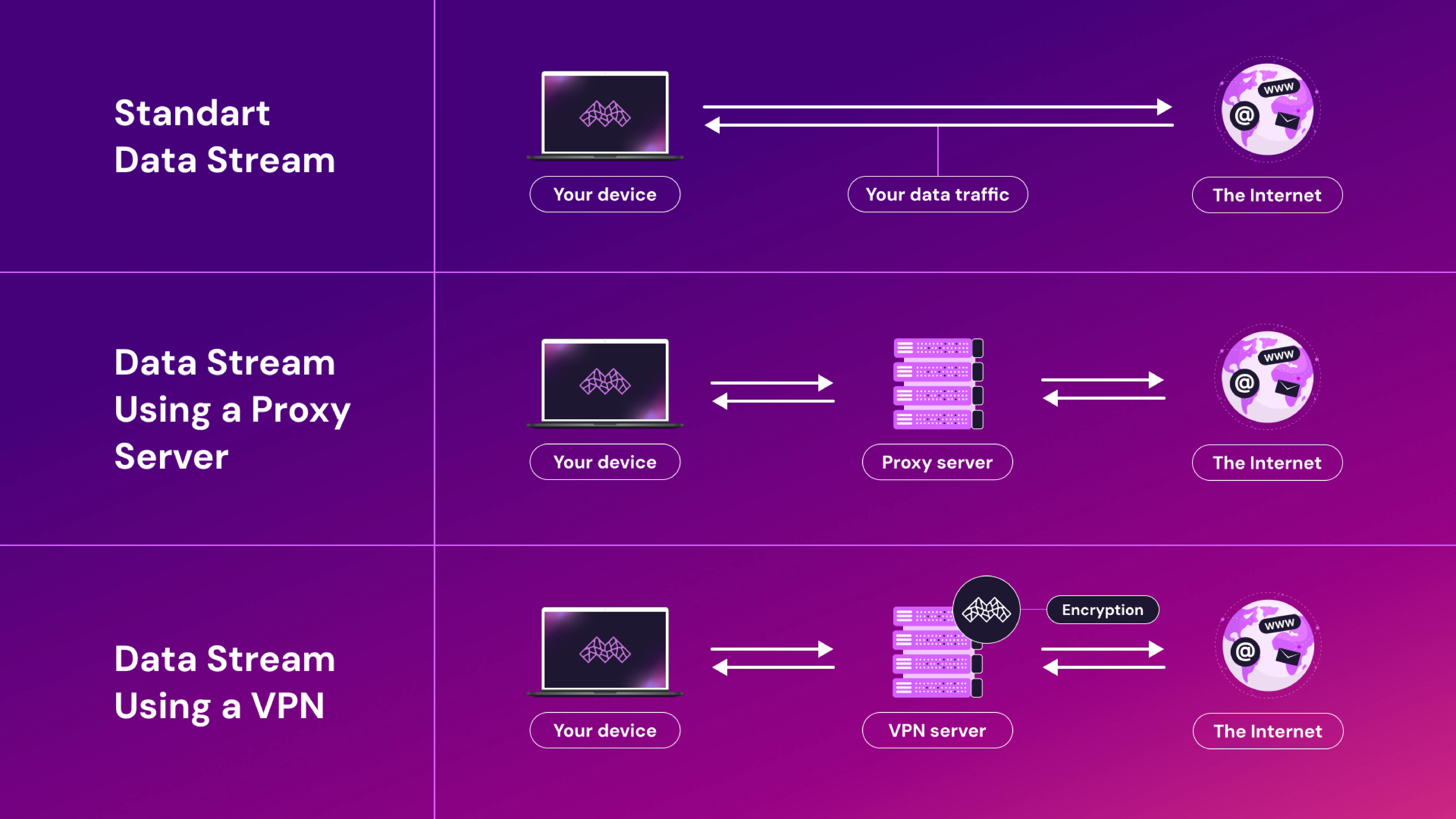
When you connect to a VPN, your internet traffic is first sent through a VPN server in another location before reaching its final destination. This makes a VPN useful when you're surfing on public Wi-Fi, like at a coffee shop or airport, and also helps you stay anonymous while browsing, streaming, or downloading.
Arguably, the biggest benefit of using a VPN server to protect your internet traffic is that a virtual private network also lets you access geographically restricted content, like when you’re traveling or booking plane tickets or hotels.
Types of VPN
Here’s everything you need to know about the different types of VPNs to make an informed decision before spending your money!
Remote Access VPN
A remote access VPN is a type of VPN designed to allow users like you to connect securely to a private network from anywhere in the world. This type of VPN typically uses protocols like PPTP, L2TP/IPsec, OpenVPN, and IKEv2/IPsec.
This VPN is most commonly used by people or employees working remotely who need to gain access to internal resources, such as confidential company files or servers, without exposing the company’s sensitive data over the public internet.
Nobody wants to be the scapegoat for accidentally exposing confidential company information on sites like Reddit, right?
Basically, this type of VPN encrypts the internet traffic between your device and the remote network you’re connecting to, thus making sure that all communication between you and the World Wide Web remains private and protected from hackers or pesky eavesdroppers.
Site-To-Site VPN
A site-to-site VPN is a type of VPN most commonly used to connect entire networks over the Internet. It’s predominantly seen in corporate environments where multiple office locations or company branches need to connect securely.
This type of VPN uses protocols like IPsec or MPLS to create a secure, encrypted internet connection between two or more networks, allowing a larger number of employees at different locations to access company resources as though they were all on the same local network.
Site-to-site VPNs can be further categorized into Intranet-based and Extranet-based VPNs. The former connects multiple offices within a single organization, while the latter connects different organizations, such as business partners, allowing secure data exchange between them.
Decentralized VPN
A decentralized VPN stands apart from traditional VPN services by using a network of independent nodes owned and operated by different people or entities rather than relying on a central server.
This VPN type uses WireGuard or OpenVPN protocols and improves privacy and security by avoiding a single point of failure or control.
With a decentralized VPN, nobody has access to all your traffic that’s being transmitted, reducing the risk of surveillance, hacking, or data breaches.
Another key benefit is using a residential IP address, which makes it harder for websites to detect or block the VPN traffic because it appears to come from regular home connections.
Additionally, decentralized VPNs typically provide users with greater reliability since the network is spread out across multiple nodes, ensuring uninterrupted access even if a particular node happens to go down.
This decentralized structure offers increased anonymity, as it’s more challenging for any central authority to trace your online activities. It's a strong choice for those who prioritize privacy and want to minimize the chances of their internet connection being monitored.
Also, it’s important to highlight that free VPNs might seem appealing because they’re, well, free, but they also come with risks. Free VPNs often have slower speeds, limited server options, and weaker encryption, which can result in reduced performance and security.
What Is a Proxy and What Are They Used For
A proxy server acts as a middleman between your device and the internet. When you use a proxy server, your internet request is first sent to the proxy, which then passes your traffic through an intermediary server and forwards it to the website or service you're trying to reach.
The response is sent back through the proxy, which delivers it to you. This process hides your IP address, helping to mask your identity online or make it appear as if you're browsing from a different location.
Most proxy servers are used to access region-specific content, manage multiple accounts, scrape web data, or simply add a layer of anonymity while browsing.
Types of Proxies
Let’s take a closer look at the different types of proxy providers and how they protect you and your internet data.
Data Center Proxy
A data center proxy isn’t connected to an internet service provider (ISP) but comes from a third-party server housed in a data center.
These proxies are fast, affordable, and ideal for general-purpose tasks like web scraping or automated browsing. However, websites may block or flag them more frequently because their IPs are easily identified as non-residential.
Residential Proxy
Residential proxies use IP addresses assigned by actual ISPs to homeowners. These IPs appear as regular user connections, making them much harder to detect or block. They're ideal for accessing geo-restricted content, ad verification, and more sensitive scraping activities.
Offered by many proxy service providers, such as GoProxies, residential proxies are the most popular choice for users all over the world.
Mobile Proxy
A mobile proxy routes your internet traffic through mobile devices using IPs assigned by mobile carriers (3G/4G/5G networks).
These are the most trusted type of proxy because they come from real mobile networks, making them almost impossible to ban or detect.
Mobile proxies are especially useful for testing mobile ads, automation on social media platforms, and accessing mobile-only content.
What Is the Difference Between Proxy and VPN
Both a proxy and a VPN reroute your internet traffic through an external server, but they differ in how they protect your data and how much of your activity they cover.
Information Security
- Only a VPN can encrypt all internet traffic, offering strong protection.
- Proxies don’t encrypt data, leaving it vulnerable to interception.
Online Privacy and Scope
- VPNs hide your IP address and protect all online activity across the device.
- Proxies only mask your IP for specific apps or browsers, with no added privacy safeguards.
Speed and Performance
- The robust encryption may affect VPN speeds, but it offers stable, secure connections.
- Proxies are usually faster but less reliable and more prone to drops.
Price and Accessibility
- A paid VPN provider will support you with full protection and a user-friendly interface. Free VPN services exist, but their quality and safety are rather questionable.
- It’s easy to find a free proxy or an affordable option, but a free proxy server will usually offer limited features and weaker privacy.
Which Is Better: VPN or Proxy?
A VPN provider like Mysterium VPN offers you robust encryption, ensuring that all your internet traffic is securely protected, which is super important for maintaining privacy and security when you’re using public networks.
In contrast, proxy service providers can only redirect specific types of traffic (like web browsing), leaving other activities unprotected. While proxies may offer faster connections for routine everyday tasks and are often easier to set up, they don't provide the same online security and privacy as a VPN.
A VPN is generally the better choice for a regular, everyday user. It offers stronger security because, unlike proxies, a VPN encrypts all traffic, making it far more reliable for protecting personal data across all online activities.
Additionally, VPNs are more user-friendly, with many offering simple, one-click setups, meaning that you don’t have to be a tech wizard to use the internet safely. In contrast, proxies can require more configuration and not provide full-scale protection.
Can You Use VPN and Proxy Together?
Yes, it’s technically possible to use a VPN and a proxy at the same time. In this setup, the proxy routes your traffic first; then, the VPN encrypts it, offering an extra layer of privacy.
However, this often results in slower speeds, more complex configurations, and limited practical benefits for regular users. While advanced users might find value in combining them for specific tasks, most people will get sufficient security and anonymity using just a reliable VPN.


Reclaim the internet that took you at your word!
Get Mysterium VPN

Frequently Asked Questions
Gintarė is a cybersecurity writer at Mysterium VPN, where she explores online privacy, VPN technology, and the latest digital threats in editorial pieces. With hands-on experience researching and writing about data protection and digital freedom, Gintarė makes complex security topics accessible and actionable.
Related Articles
.png)