- Blog >
- Can VPN Be Tracked? Everything You Need to Know
Can VPN Be Tracked? Everything You Need to Know


Key Takeaways
- True privacy requires combining a VPN with safer online browsing habits; no single tool does the whole job.
- A VPN encrypts your traffic and masks your IP address, but it doesn't make you totally invisible.
- The type of IP used matters: VPNs offering residential IPs are significantly harder to detect than datacenter VPNs.
The short answer is yes, VPN use can sometimes be detected, and your activity can sometimes be traced, depending on who's looking and what data exists.
A VPN does genuinely useful work. It encrypts your traffic and hides your browsing from people who'd otherwise see it. But it doesn't guarantee total anonymity, and understanding where the gaps are is what keeps you private.
Being "tracked" online isn't one thing. It means something different depending on who's doing it:
- A website may check your IP to see if you're using a VPN.
- Your ISP or network admin may monitor connection patterns.
- Law enforcement may obtain logs through legal processes.
- A VPN provider with poor logging practices may expose your data.
This article walks through each of those, explains what a VPN actually hides, and gives you practical steps to plug the gaps.
What Does a VPN Hide?
When you connect to a VPN, your device establishes an encrypted tunnel to a VPN server. Your ISP sees encrypted data going to that server, not the websites you're visiting. Using a VPN hides:
- Your real IP address from websites and apps.
- Your browsing activity from your local network and ISP.
- Your data is safe from anyone snooping on you on public Wi-Fi.
That said, depending on your VPN's infrastructure, the provider itself can potentially see which server you're using, how long you're connected, and how much data you're sending. Whether they log any of it depends entirely on their policies; more on that later.
What a VPN Doesn't Automatically Hide
Here’s what your VPN use won’t hide:
- Accounts and cookies: If you're logged in to Google, Meta, or other platforms, they know who you are regardless of your IP address. Cookies follow you across sessions and websites, even with a VPN running.
- Browser fingerprinting: Websites collect data points about your device (screen resolution, OS, browser version, installed fonts, time zone, etc.) and combine them into a unique profile. Even if your IP changes, that fingerprint doesn't.
- Malware and trackers: A VPN encrypts traffic at the network level. It doesn't remove trackers embedded in websites or stop malicious software already on your device.
- Your VPN account details: Your email, payment method, and account information exist with the provider in order to run your subscription.
Can Your Activity Be Tracked While Using a VPN?
Yes, but the method matters. A VPN substantially improves your privacy, but cookies, browser fingerprinting, and device-level trackers can still follow you around.
The key distinction is between network-level tracking and account or browser-based tracking. A VPN handles the first well. It doesn't touch the second.
A VPN changes your visible IP address. It doesn't change your whole digital footprint. If you're signed into the same accounts in the same browser and device, many dots can still be connected.
Tracking by Websites and Advertisers
Cookies travel in your browser, not your IP address, so they follow you across sessions regardless of VPN status. Logged-in accounts (Google, Meta, Amazon, etc.) tie your behavior to your profile, no matter where the connection appears to come from. Ad trackers keep building profiles on you unless you block them separately.
Browser fingerprinting works the same way. Websites collect technical details about your device and browser (resolution, OS, browser version, time zone) and build a unique identifier from them. A VPN only changes your IP. Fingerprinting doesn't care where you connect from; it cares how your device behaves.
That's why advertisers and analytics platforms can often recognize you across sessions, locations, and networks, even with a VPN active.
How Residential IPs Are Harder to Track
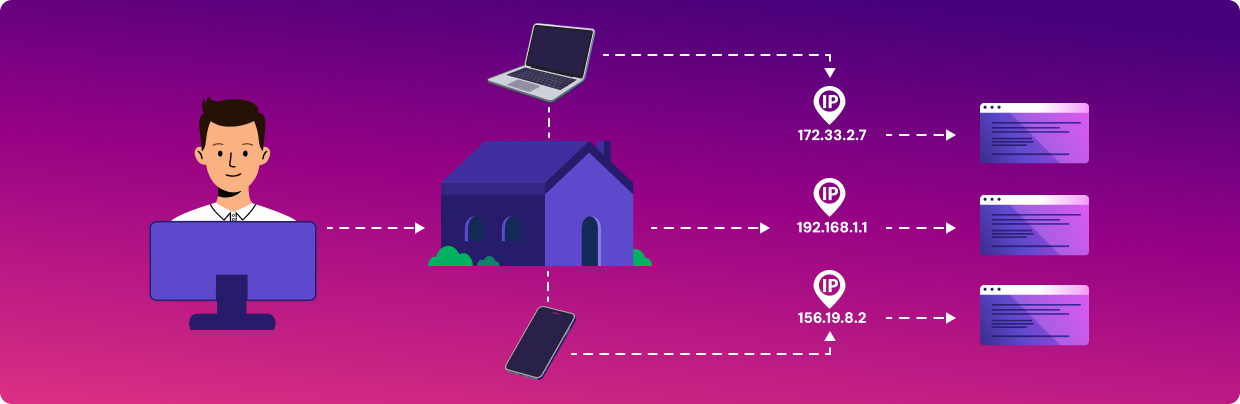
Most VPNs route traffic through data center servers (commercial hosting facilities that own large blocks of IP addresses). These ranges are well documented, and websites check incoming connections against databases of known VPN and data center addresses. If your IP is on it, you get flagged and blocked.
Residential IPs work differently. These are addresses that ISPs assign to real households, so that any website or detection system sees your connection as ordinary home traffic. That's why residential VPNs like Mysterium VPN are significantly harder to detect (and harder to trace) than standard VPNs.
It's not a complete solution on its own, since fingerprinting and account-based tracking still apply. But at the network level, a residential IP is a meaningful step up.
What Mysterium VPN Tracks?
Mysterium VPN doesn't log your browsing activity, your connections, or the websites you visit. Your traffic is end-to-end encrypted, and no records are kept that could link your online activity to your identity.
Like all providers, we collect minimal data to keep the service running – basic account information and limited operational data, such as payment status or error diagnostics. But these aren't activity logs, and they're not connected to your browsing, IP address, or traffic.
Payments work the same way. Card and wallet payments share standard transaction details with payment processors. Crypto payments require only an email and a transaction confirmation: no identity, no wallet history.
Our system keeps subscription management and network activity completely separate. That's what gives our no-logs policy practical meaning beyond a marketing claim.
Can Police or Governments Track a VPN User?
It depends on where the VPN is based, what legal agreements that country has with others, and what logs the provider keeps.
Police can track a VPN user’s IP address, but need the provider's cooperation to unmask the real IP address behind it. If logs exist, they can be handed over. IPVanish is the most cited example: it handed connection logs to US federal investigators in 2016, despite marketing itself as a no-log service.
Beyond logs, investigators can also use account details tied to the subscription, endpoint monitoring of suspect devices, and evidence from seized hardware. A good VPN makes tracing significantly harder. It doesn't make it impossible under serious legal pressure.
Does a VPN Stop Your ISP From Tracking You?
Mostly yes, but not entirely. ISPs can detect VPN usage by analyzing traffic patterns. Advanced firewalls recognize VPN protocol signatures, and ISPs may monitor known VPN ports. What your ISP can still usually see:
- That you're connected to a VPN.
- The VPN server's IP address.
- Connection times and data volume.
What it can't see is the websites you visit or what you do inside the tunnel. If your main concern is stopping your ISP from logging your browsing history, a VPN handles that well.
One common mix-up: a VPN and incognito mode aren't the same thing. Incognito stops your browser from saving history and cookies on your device; your ISP and the sites you visit can still see everything. A VPN affects what external parties observe, not what your browser stores locally.
Can Free VPNs Be Tracked More Easily?
Often, yes. Free VPNs have to fund themselves somehow, and the tradeoffs are usually bad for privacy. Some log connection data (your IP, the sites you visit, connection times, data transferred) and then sell it to advertisers.
Beyond logging, free VPNs tend to have weaker encryption, vague privacy policies that technically permit data collection, shared IP addresses that quickly end up on VPN detection blacklists, and limited infrastructure that makes leaks more likely.
If consistent access and real privacy are both goals, free VPNs usually underdeliver on both.
How to Reduce Tracking While Using a VPN
A VPN is a strong foundation, but privacy works in layers.
Best Practices for Improved Online Privacy
- Choose a reputable VPN with transparent logging policies: Look for independent audits and a clear explanation of what the provider's architecture actually prevents from being logged.
- Use HTTPS websites: HTTPS encrypts the connection between your browser and the site, adding a layer on top of the VPN tunnel.
- Use VPN kill switch: If your VPN drops, a kill switch cuts internet access entirely rather than letting your real IP slip through. Make sure it's turned on.
- Check for DNS, IP, and WebRTC leaks: Tools like dnsleaktest.com let you verify your connection is actually secure.
- Use privacy-focused browsers or browser settings: Firefox and Brave both meaningfully reduce fingerprinting and cookie-based tracking.
- Block third-party cookies and trackers: Reject optional cookies when prompted. An extension like uBlock Origin can handle this automatically.
- Stay logged out of personal accounts when anonymity matters: One of the most effective and most overlooked steps.
- Keep software updated: Outdated browsers and operating systems carry known vulnerabilities that can compromise your privacy tools.
Conclusion
VPN use can be detected by websites using IP reputation databases, ISPs reading traffic patterns, or anyone spotting VPN protocol signatures in connection data. Your activity can still be tracked through cookies, fingerprinting, logged-in accounts, and ad trackers that ignore your IP entirely.
A VPN is one of the most effective privacy tools available. But it's a privacy tool, not an invisibility cloak.
The people who get the most out of it combine it with smarter habits: staying logged out when it matters, rejecting optional trackers, checking for leaks, and choosing a VPN that doesn’t log your data.
You should also consider VPN types. Residential VPNs use IPs assigned by ISPs to real homes, so your connection looks like ordinary home traffic. That makes it harder to detect and block them compared to a datacenter IP that announces itself to every reputation database on the internet.


Reclaim the internet that took you at your word!
Get Mysterium VPN
Frequently Asked Questions
Gintarė is a cybersecurity writer at Mysterium VPN, where she explores online privacy, VPN technology, and the latest digital threats in editorial pieces. With hands-on experience researching and writing about data protection and digital freedom, Gintarė makes complex security topics accessible and actionable.