Starlink VPN: How to Use a VPN With Starlink Internet



Key Takeaways
- Starlink delivers high-speed satellite internet worldwide, making reliable connectivity possible in rural, mobile, and off-grid environments.
- A VPN adds an important layer of privacy and security to Starlink connections by encrypting data and masking your IP address.
- Because Starlink uses CGNAT, VPNs usually work best when installed directly on devices or through a third-party router in bypass mode.
- Choosing a fast, reliable VPN like Mysterium VPN can help maintain performance, protect your data, and improve your overall Starlink experience.
The international telecommunications provider, Starlink, is reshaping global internet access by delivering high-speed satellite connectivity to even the world's most remote corners.
Whether you’re traveling, working off-grid, or simply living in a rural area without adequate internet access, Starlink offers a powerful alternative to traditional ISPs.
Due to its portability and global reach, Starlink is rapidly becoming a favorite among digital nomads, RV travelers, and remote workers alike. But like any internet service, Starlink comes with its own set of privacy and accessibility challenges.
A Starlink VPN can help enhance your experience by securing your data, bypassing regional content restrictions, and improving performance under certain conditions.
In this Mysterium VPN blog post, we’ll explain how to use a VPN with Starlink, its benefits, and which setup options work best for different use cases.
What Is Starlink?
SpaceX developed and launched Starlink, a satellite-based broadband internet service, in 2019. This project aims to bring high-speed connectivity to virtually every corner of the world, especially to regions previously underserved or entirely unserved by traditional ISPs.
Unlikely legacy satellite providers that count on a few satellites in high Earth orbit (HEO), the Starlink project employs a rapidly growing constellation of low Earth orbit (LEO) satellites, reaching a maximum altitude of around 500 miles.
This proximity extraordinarily minimizes the latency traditionally associated with satellite internet connections. As a result, Starlink offers customers a more responsive and seamless online experience.
Starlink’s infrastructure is designed to handle modern internet demands, from HD streaming and large file downloads to cloud-based work and video conferencing, like your daily work meetings on ZOOM.
The Starlink project has more than two million active users worldwide, and the service is available on all seven continents, including Antarctica, standing as a legitimate contender in the ISP market.
Starlink appeals to a wide range of customers, including a growing number of digital nomads and RV travelers, as well as off-grid workers, emergency responders, and homeowners in rural, hard-to-reach areas.
Moreover, Starlink is used in remote-first industries like agriculture, maritime, mining, and aviation. As SpaceX continues to launch new satellites and expand coverage, the Starlink project plays a growing role in bringing the internet to everyone who needs it.
Advantages of Starlink
Despite the fact that Starlink is a relatively new technology, it has quickly gained traction thanks to some of its unique benefits. Here’s an overview of the advantages of Starlink:
- Wide coverage: Starlink is now available in more than 100 countries.
- High speeds: Starlink download speeds can exceed 100 Mbps in many locations.
- Low latency: Thanks to low Earth orbit (LEO) satellites, the Starlink latency is markedly lower than traditional satellite internet.
- Easy setup: Starlink offers plug-and-play hardware with self-aligning satellite dishes.
- No data caps: Many plans offered by Starlink include unlimited data, which is a rarity for satellite ISPs.
Disadvantages of Starlink
No company is perfect, including SpaceX’s Starlink. Let’s take a look at some of the disadvantages of Starlink you should keep in mind:
- Network congestion: The performance of your Starlink internet connection can sometimes drop in heavily populated areas.
- Weather sensitivity: Weather events such as heavy rain or snowfall can negatively impact signal quality and performance.
- High setup costs: The Starlink hardware is rather expensive when compared to traditional ISPs and their setup costs.
- No native VPN support on routers: Setting up a VPN service on a Starlink router calls for additional configuration.
- Latency fluctuations: While it has improved, the latency is still higher than that of fiber or cable connections.
Applications of Starlink
Srarlink’s global infrastructure enables connectivity for a wide range of use cases, from everyday use to high-stakes military operations. Here’s an overview:
Remote Living & Rural Internet Access
One of the main applications of Starlink is the ability to bring high-speed internet to rural and remote communities, which are often underserved and ignored by regular internet providers.
With Starlink, residents in mountainous areas, deserts, forests, or areas without already existing fiber infrastructure can access low-latency internet without having to rely on traditional ISPs.
Digital Nomads & Mobile Workforces
From your favorite TikTok vanlifers and RV travelers to construction crews, Starling empowers mobile lifestyles. Users can now work, stream, and stay connected from almost anywhere with a clear view of the sky.
Maritime & Aviation
Starlink offers internet for ships, yachts, and aircrafts, which were previously underserved by ISPs, with only borderline slow or expensive options. With Starlink, passengers and crews can surf the web, make VoIP calls, and smoothly run business operations while in transit.
Emergency & Disaster Response
NGO’s, first responders, and aid organizations use Starlink services to restore vital communications during natural disasters, war, civil unrest, or other crises. It allows for coordination, live updates, and access to online tools where terrestrial internet is down.
Agriculture & Industrial Use
Starlink supports precision farming and remote industrial operations by connecting on-site sensors, vehicles, and analytics platforms, particularly in regions where other networks fall short.
Military Applications
Starlink has become a powerful tool for military operations and crisis communications. Its low-latency, high-speed satellite network is increasingly integrated into defense strategies, especially where traditional infrastructure is unavailable or compromised.
Famously, Starlink was activated in Ukraine shortly after Russia’s 2022 invasion. It has since become critical for both military and civilian use. Ukrainian forces use it for drone coordination, command communication, and infrastructure support. Although SpaceX expressed concerns about its use in offensive attacks, the service remained operational.
Moreover, following the 2023 Gaza war, Musk agreed to enable Starlink access for humanitarian aid, pending Israeli government approval. The situation highlighted the geopolitical sensitivity of Starlink’s global reach.
In both warfare and humanitarian crises, Starlink is redefining satellite internet’s role in global security.
Can You Use a VPN With Starlink?

Yes, you can use a VPN with Starlink – and if online privacy matters to you, it's a wise choice.
Starlink uses Carrier-Grade Network Address Translation (CGNAT), which means multiple users share the same public IP address. This setup makes it difficult to accept inbound connections and nearly impossible to install a VPN directly on the official Starlink router, especially for residential users.
To use a VPN like Mysterium with Starlink, the easiest and most effective method is to install it directly on your devices (such as a phone, tablet, or computer).
While Starlink routers don’t currently support NAT traversal (a feature needed to bypass CGNAT and install a VPN directly), you can still use a VPN on your network by connecting a VPN-compatible router via the Starlink Ethernet adapter and enabling Bypass Mode.
Starlink uses Carrier-Grade Network Address Translation (CGNAT), which can make it harder to install a VPN directly on the Starlink router. CGNAT means multiple users share a single public IP address — a setup that complicates incoming connections and port forwarding.
VPN availability on Different Starlink Plans
Starlink offers users several service plans, and VPN compatibility might vary slightly:
- Residential plan: This plan is compatible with devices that support VPN apps; router-based VPN requires bypass mode or 3rd party software.
- Mobile plan: VPN apps work well with these plans, though latency and performance may vary when moving.
- Business plan: Typically, this plan offers more stable connections and better bandwidth; it’s also better suited for an advanced VPN configuration.
- Maritime and aviation plans: VPN apps can be used with these plans, but due to the constant motion and satellite handoffs associated, you should expect higher latency.
Why Do I Need a VPN for Starlink?
Pairing Mysterium VPN with your Starlink offers several benefits. Here’s an overview:
- Privacy protection: A VPN encrypts your data and hides your real IP address from ISPs and third parties.
- Global access: If you’re trying to access content that’s available in your home country when you’re abroad, a VPN can help you get what’s yours.
- No ISP throttling: Tools like Mysterium VPN can help you mitigate the connection speed limits that are put in place by your internet service provider.
- Safety on public Wi-Fi: If you’re on the move with the Starlink Roam plan, Mysterium VPN will keep you safe in hotels, trains, airports, malls, cafes, restaurants, etc.
- Remote access: You can use a VPN to safely access your home or office networks.
How To Use a VPN With Starlink
There are several different ways to use a VPN with your Starlink connection. The simplest and most reliable method is to install a VPN app directly on your devices.
Install VPN App on Your Devices
- Choose a VPN provider compatible with Starlink (e.g., Mysterium VPN, now up to 78% off).
- Download and install the VPN app on your device.
- Sign in and connect to a server in your desired location.
- You’re now securely connected via VPN over Starlink.
Set Up a VPN on a Third-Party Router
- Put the Starlink router in bypass mode.
- Connect your VPN-capable router to one of the Ethernet ports on the back of the router..
- Log in to a VPN-capable router and configure your VPN.
- All connected devices now use the VPN.
How To Set Up VPN on Starlink Router
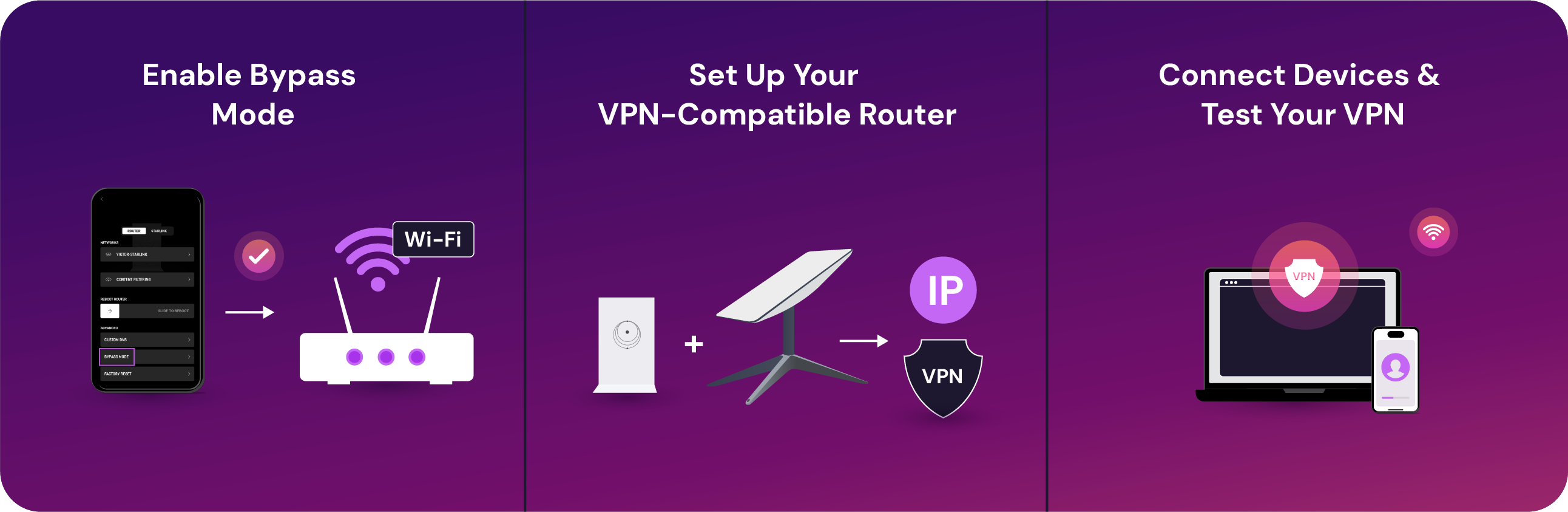
Do you have an official Starlink router? Although they don’t natively support VPN configurations, you can still get a VPN for your Starlink with these steps:
Enable Bypass Mode
Open the Starlink app on your device, go to Settings, and toggle Bypass Mode on. This disables the built-in Starlink Wi-Fi router, allowing you to use your own router instead.
Set Up Your VPN-Compatible Router
Connect a 3rd-party router to your Starlink router with an Ethernet cable. Log in to this router’s settings by entering its IP address into a browser, and install your VPN in the router’s admin panel.
Connect Devices & Test Your VPN
Once your router runs the VPN, connect your devices to this new Wi-Fi network. Surf around your favorite websites to check if everything is working well. Also, and most importantly of all, check if your IP address has changed.
If you have a Starlink router, this setup ensures you can still get VPN protection for your whole network.
How a VPN Works With Starlink
A virtual private network encrypts your data and routes it through a remote server, masking your real IP address and adding a layer of privacy. With Starlink, this encrypted tunnel is sent over satellite infrastructure, which can introduce some latency.
While VPNs generally work well with Starlink, real-time use cases like online gaming or VoIP may experience delays depending on server location and network congestion.
What Is Starlink VPN Passthrough?
A Starlink VPN passthrough is a router feature that allows your encrypted VPN traffic to travel through your router to your device.
The good news is that Starlink routers support VPN passthrough so that you can use VPN apps on your smartphone, phone, tablet, or laptop without hassle.
However, if you want to run a VPN on your entire network, the passthrough feature alone won’t suffice. That’s because Starlink’s router doesn’t allow you to install a VPN directly onto it. In this case, you must enable Bypass Mode in the Starlink app.
This setup allows every device in your home to be protected without needing to install the VPN app on each one. So while Starlink does support VPN use, setting it up at the router level requires a few extra steps with the proper hardware.
How To Fix Common Starlink VPN Issues
Connectivity issues can be super annoying. Here’s how you can solve them:
- Slow speeds: Are you noticing a drop in speed? Try switching to a closer VPN server for faster, more stable performance. Also, choosing a protocol like WireGuard instead of older options like OpenVPN can significantly boost speeds.
- Dropped connections: Starlink maintains internet service through a constantly shifting network of satellites, which means your connection may occasionally switch satellites mid-session.
- No connection: If your VPN won’t connect, start by double-checking your settings. Ensure you've entered the correct VPN server address, port number, and protocol (like OpenVPN or WireGuard) in your app or router's setup page.
Tips for Optimizing VPN Performance on Starlink
Here are some tips and tricks to optimize how your VPN works with Starlink.
- Pick servers that are close to your actual location.
- Use lightweight communication protocols like WireGuard or IKEv2.
- Avoid peak hours to reduce network congestion.
- Enable split tunneling to route only necessary traffic through a VPN.
- Remember to regularly update your VPN app, operating systems, and router firmware.
Should You Use a Free VPN for Starlink?
We get it, living is getting more and more expensive. That’s why we also understand that a free VPN may sound like a good idea. However, it’s not all great. You need to know that free VPNs come with some significant drawbacks:
- Limited bandwidth: A free VPN won’t allow you to stream videos or download large files effectively.
- Slower speeds: Free VPNs often have congested servers, resulting in poor overall performance and slow connection speeds.
- Privacy concerns: The companies behind free VPNs log or sell user data to make money.
A reputable paid VPN like Mysterium offers much better security, performance, and user control, making it the safer choice for Starlink users.
How To Choose the Best VPN for Starlink
When picking the best VPN service for Starling, you should be on the lookout for:
- Fast, stable connections, which are optimized for high-latency environments.
- A large number of servers.
- Robust encryption policies and a no-log policy.
- A user-friendly interface and easy-to-use apps.
- Support for NAT traversal and bypassing CGNAT.
- Easy setup across all devices, operating systems, and routers.
- Quick and helpful responsive customer support.
- Affordable pricing and flexible plans.
- Strict safety and privacy protections.
Starlink VPN: Final Thoughts
All in all, using a VPN with Starlink is a good idea. Starlink brings people fast, global satellite internet, but using a VPN can add the critical layer and control you need.
Using VPN providers like Mysterium VPN with Starlink protects your data, hides your IP, and helps bypass censorship, whether you’re streaming, gaming, or working remotely.
Don’t leave your online activity exposed to the sky. Power up your Starlink connection with Mysterium VPN, and enjoy a private, secure internet connection wherever you are.


Sunscreen, passport, Mysterium VPN. You’re ready.
Get Mysterium VPN

Frequently Asked Questions
Gintarė is a cybersecurity writer at Mysterium VPN, where she explores online privacy, VPN technology, and the latest digital threats. With hands-on experience researching and writing about data protection and digital freedom, Gintarė makes complex security topics accessible and actionable.
Related Articles
.png)
.png)