What Is a Residential IP and How Does It Work?


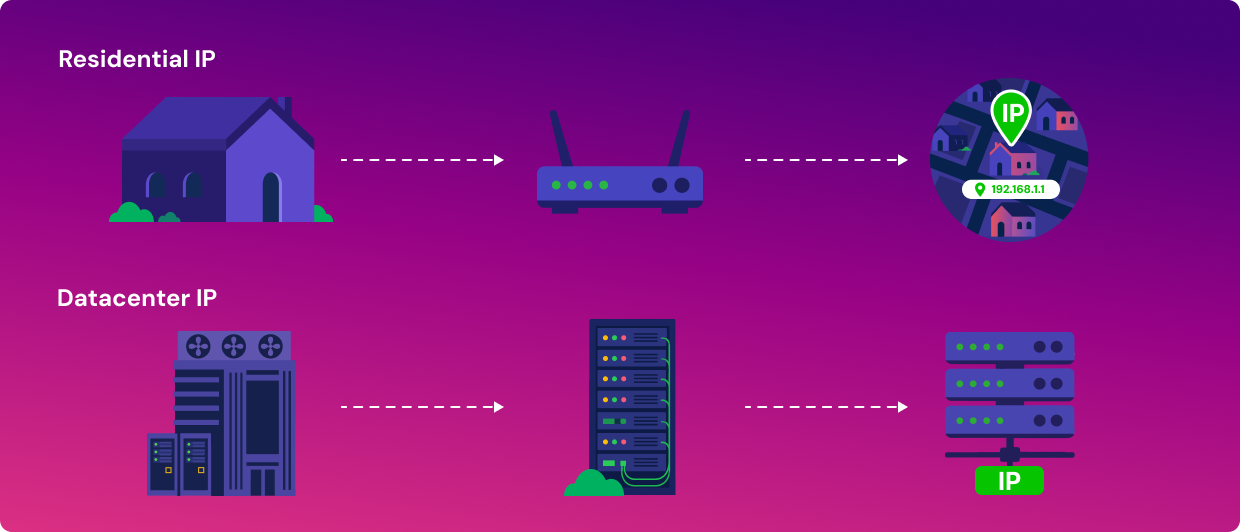
A residential IP address is a type of IP address that your internet service provider (ISP) assigns to your home network, not one given to a server in a commercial data center. In other words, it's the address your router uses to connect to the internet, tied to a physical home account rather than to a rack of hardware in a warehouse somewhere.
Depending on your ISP, it's either dynamic, meaning it changes periodically, or static, meaning it stays fixed indefinitely. That single detail, where the IP address comes from, decides how the rest of the internet treats your traffic, and it's the reason two people running the exact same app can get treated very differently by the same website.
Key Takeaways
- A residential IP is assigned by your ISP to a home account, while a datacenter IP is issued to servers owned by hosting or cloud providers.
- Most residential IPs are dynamic and change periodically, though static residential IPs exist, usually at extra cost or on business accounts.
- Websites often apply more scrutiny to datacenter IP ranges because they're easier to identify at scale as commercial infrastructure.
- Residential IP VPNs route traffic through real home connections instead of datacenter servers, though privacy still depends on the rest of the setup, not the IP type alone.
How Residential IP Addresses Work
Every ISP owns blocks of IP addresses registered to its network. When a household signs up for home internet, the ISP assigns one of them to the account, and that address represents the home to the rest of the internet, no matter how many devices in the house share the connection.
Most residential IPs are dynamic. Your ISP reassigns you a different one periodically; it may be every few days, at every router restart, or on a longer rotation depending on the provider's own infrastructure and policies. A smaller share is static, meaning the address stays the same indefinitely unless you change providers or plans.
- Dynamic residential IP: changes periodically, standard for most home connections, cheaper for ISPs to manage at scale.
- Static residential IP: stays fixed, usually costs extra or requires a business-tier account, useful for hosting, remote access, or running a home server.
Neither type of IP is inherently better. A dynamic IP is fine for regular browsing, since most people never notice or need to know if their IP has changed. A static IP matters more if something on the other end needs to consistently recognize your connection, like a security camera system or a remote desktop setup. The distinction is about function, not quality.
It's also worth understanding that a residential IP usually represents a whole household, not a single device. Your router uses a process called network address translation (NAT) to let every phone, laptop, and smart speaker in the house share that one public address when talking to the outside internet, while keeping each device's traffic sorted out internally. So, when a website sees a residential IP, it's typically looking at one home, potentially with several people and devices behind it, not one individual user in isolation.
Residential IP vs Datacenter IP
The practical difference between a residential IP and a datacenter IP comes down to who issues it, what it's typically used for, and how visible that origin is to the websites and services receiving your traffic.
| Residential IP | Datacenter IP | |
| Assigned by | Internet service providers (ISPs) | Cloud and hosting providers |
| Typical use | Home internet, everyday browsing | Servers, VPNs, proxies, cloud applications |
| Detection by websites | Generally treated as ordinary user traffic | Often flagged for additional scrutiny |
| Cost/availability | Tied to a home account, not sold individually | Available in bulk, purchased directly |
Datacenter IPs aren't inherently suspicious; they're just easier to spot. A block of addresses registered to a cloud provider is public information, and any website that wants to flag automated or high-volume traffic can cross-reference it in seconds. A residential IP, however, is registered to an ISP that also serves millions of ordinary households, so it doesn't stand out the same way. A server farm in Virginia just doesn't look like someone's living room Wi-Fi, no matter how much they try.
This is part of why bulk web scraping, ad verification checks, and sneaker-bot style automated purchasing tend to choose residential IPs. It's not that datacenter IPs are broken or unusable for these tasks; it's that they're recognizable at scale, and residential options blend in with regular household traffic instead of standing out as a known commercial block.
Cost and availability follow a similar logic. A business can rent or buy a block of datacenter IPs directly from a cloud provider in minutes, since that's exactly the kind of infrastructure they sell. Residential IPs don't work that way. Nobody sells you a slice of a neighborhood's home internet directly, so accessing residential IPs usually means going through a service built specifically to route traffic through real home connections, like a residential proxy provider or a residential VPN, like Mysterium VPN.
Residential IPs and VPNs
Most mainstream VPNs route your traffic through servers in data centers, which is efficient to operate and easy to scale, but it also means the traffic is recognizable as coming from a VPN. A residential IP VPN works differently: it routes your connection through real residential IPs instead of datacenter servers, so your traffic looks more like it's coming from an ordinary home connection rather than a known VPN range.
This isn't a magic bypass for every kind of blocking or detection, and it doesn't make your traffic invisible. It's an architectural difference in where the connection originates, and that difference changes how the connection appears to the websites and services on the other end; nothing more, nothing less. A residential IP VPN can still be identified through other means, and how well it holds up depends on the provider, how your traffic is routed, and how the service is configured overall.
Mysterium VPN's network is built around this idea. Instead of routing traffic exclusively through company-owned servers, it goes through a global network of 7,500+ independently run residential IPs contributed by everyday users.
For everyday use, like getting around overly aggressive CAPTCHA checks or reducing how often you're flagged as a bot while browsing, a residential IP can make a practical difference. It won't guarantee a specific outcome on any given site, since each platform makes its own detection decisions, but the underlying approach differs enough from a standard datacenter VPN to matter.
If you want to see how that network is structured in more detail, read our Mysterium VPN review, which breaks down how Mysterium VPN's decentralized network works. For a side-by-side comparison of residential versus datacenter VPN traffic, our breakdown of residential vs datacenter VPNs covers the practical differences in more depth.


Save up to 85% off for Black Friday!
The ultimate digital shield, now at a fraction of the cost.

Frequently Asked Questions
Gintarė is a cybersecurity writer at Mysterium VPN, where she explores online privacy, VPN technology, and the latest digital threats in editorial pieces. With hands-on experience researching and writing about data protection and digital freedom, Gintarė makes complex security topics accessible and actionable.
Related Articles